> ## Documentation Index
> Fetch the complete documentation index at: https://docs.testsprite.com/llms.txt
> Use this file to discover all available pages before exploring further.
# Overview
> The verification layer for the agentic coding era — TestSprite CLI puts the full testing platform in your coding agent's hands.
## What is the TestSprite CLI?
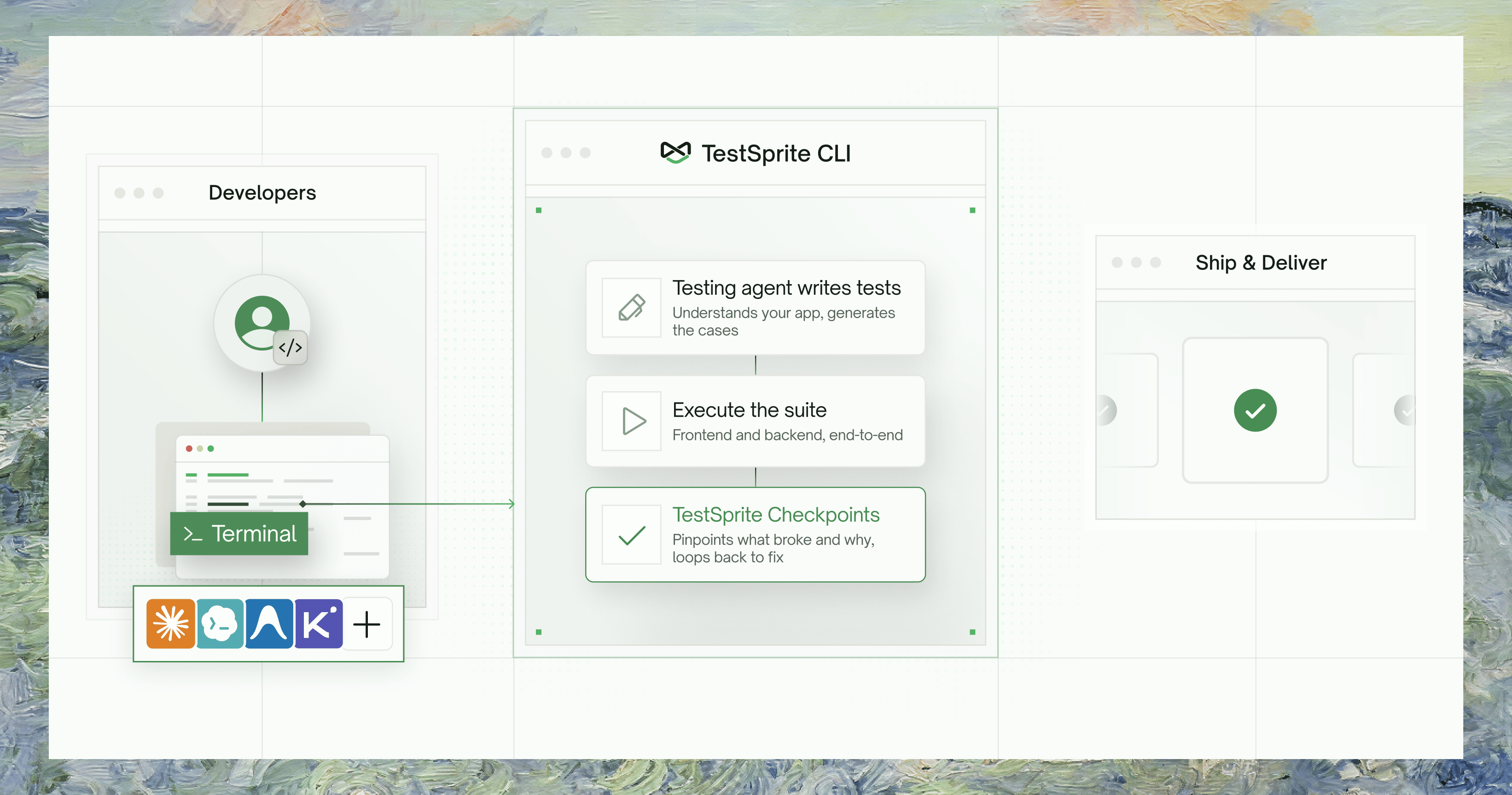
**The verification layer for the agentic coding era.** TestSprite is the AI testing platform 100,000+ teams use to test their software — frontend and backend — in the cloud, against the live product, not mocks. The CLI puts that platform in your coding agent's hands: structured output it can parse, exit codes it can branch on, and one self-consistent failure bundle it can act on — no dashboard scraping.
The CLI shares the same backend, projects, and tests as the [Web Portal](/web-portal/getting-started/overview) and the [MCP Server](/mcp/getting-started/introduction). A test you create from the terminal shows up in the dashboard, and vice versa.
The `--output json` response shape and exit codes are a **stable contract** your agents and CI can rely on — designed to stay backward-compatible as the CLI grows.
### Why a CLI for coding agents?
Every step between "agent writes code" and "agent reads what broke" is a manual context-transfer tax. The CLI removes it: your agent describes intent and reads results, never needing to know how the test was driven — only what a real user experienced.
Agent writes code → **you** run the app, click around, screenshot the result, paste it back, and type *"the checkout button is broken on mobile."*
Agent describes intent → triggers a real cloud run → **reads the verdict itself.** No human in the middle.
What broke comes back as **one self-consistent failure bundle** the agent can act on — all anchored to the same snapshot. The CLI refuses to stitch data from two different runs, so an agent never reasons over a frankenstein context:
| In the bundle | What it contains |
| :----------------------- | :------------------------------------------------------------------------------- |
| Failing step | The exact step that broke, plus its neighbors for context. |
| DOM snapshots | The DOM at the point of failure — your agent can read it without a vision model. |
| Fix guidance | A root-cause hypothesis and a recommended fix target. |
**Run any command offline before you have an API key.** Prepend `--dry-run` to emit a canned sample matching the real response shape — no credentials needed. It's the fastest way to learn the surface.
## The verification loop
Install once globally, then run `testsprite setup`. It prompts for your API key, verifies it against the platform, and installs the verification skill into your agent's project — so your agent already knows when and how to run tests.
```bash theme={null}
npm install -g @testsprite/testsprite-cli
testsprite setup
```
Describe the behavior you want to verify as a plan file — write it yourself, have your coding agent author it, or let TestSprite generate it. One command then creates the test, triggers a real cloud run against your live app, and blocks until a verdict:
```bash theme={null}
testsprite test create \
--project proj_8f0f6 --type frontend \
--plan-from ./checkout-flow.plan.json \
--run --wait --output json
```
Exit 0 means the test passed, exit 1 means it failed — you (or your agent) branch on the exit code.
Pull a self-contained failure bundle — no back-and-forth across endpoints:
```bash theme={null}
testsprite test failure get test_3a9f21c7 --out ./.testsprite/failure
```
The bundle contains the failing step and its neighbors, DOM snapshots rendered as text, the test source, a root-cause hypothesis, and a recommended fix target.
After fixing the code, replay the test cheaply (frontend replay costs no credits):
```bash theme={null}
testsprite test rerun test_3a9f21c7 --wait
```
Every pass is banked into the durable suite. Next time you ship a change, you rerun rather than recreate — coverage compounds into a lasting record of every requirement you've verified, far bigger than any context window.
## Who It's For
| Audience | What they get |
| :------------------------------------------- | :--------------------------------------------------------------------------------------------------------------------- |
| AI coding agents *Primary* | Claude Code, Codex, Cursor, Cline, Antigravity, and similar — the agent drives the loop without a human in the middle. |
| Developers at a terminal | The same surface, with predictable commands, consistent flags, and machine-readable output. |
| CI pipelines | Stable `--output json` contract, stable exit codes, and non-interactive `--from-env` auth. |
## One Platform, Three Surfaces
All three surfaces hit the same backend and share the same tests, projects, and runs. Choose by context:
* **What it's for:** Humans — visual project setup, PRD uploads, test exploration, dashboards, scheduling, billing, and team management.
* **Best when:** You're starting a new project, reviewing test coverage visually, managing schedules and monitors, or handling billing and credentials.
* **Limitations:** Not scriptable; not designed for agent-driven loops.
* **What it's for:** IDE integration for the localhost-dev loop. Lives in your IDE; the agent calls it as a tool during a session.
* **Best when:** Your app is running on `localhost` — the MCP Server owns the tunnel that exposes it to the cloud runner.
* **Limitations:** Session-scoped; not scriptable; not CI-compatible.
* **What it's for:** The scriptable, agent-safe, CI-compatible surface. Structured JSON output, stable exit codes, non-interactive operation, and durable run artifacts.
* **Best when:** An agent is driving the verify → fix loop, you're gating a CI pipeline on test results, or you want to read structured failure context without opening a browser.
* **Limitations:** Does not support `localhost` targets (use MCP + tunnel). Does not create schedules or manage billing (use the Portal).
| Capability | Web Portal | MCP Server | CLI |
| :----------------------------- | :-------------------- | :-------------------- | :-------------------- |
| Create and run tests | | | |
| Visual dashboards & scheduling | | — | — |
| `localhost` targets via tunnel | — | | — |
| Agent-driven | — | | |
| Scriptable / CI | — | — | |
| Structured failure bundles | — | | |
| Billing & org management | | — | — |
## Where to Go Next
Install the CLI and sign in in under 2 minutes
Create a test, run it, and read what broke — end to end
Projects, tests, runs, and the concepts behind them
Every command, flag, and exit code