> ## Documentation Index
> Fetch the complete documentation index at: https://docs.testsprite.com/llms.txt
> Use this file to discover all available pages before exploring further.
# CI/CD
> Gate your pipeline on TestSprite results using stable exit codes and JSON output.
## Why the CLI is CI-friendly
The `testsprite` CLI is designed from the ground up for unattended execution:
* **Non-interactive auth** — set `TESTSPRITE_API_KEY` as a secret; the CLI never prompts when the variable is present.
* **Stable `--output json`** — every command emits a machine-readable JSON envelope that your pipeline can parse and forward.
* **Stable exit codes** — exit 0 means the run passed; any non-zero exit lets the shell fail the job. No text scraping required.
## Authenticating in CI
Set your API key as a repository or environment secret. In GitHub, go to Settings → Secrets and variables → Actions and click New repository secret:
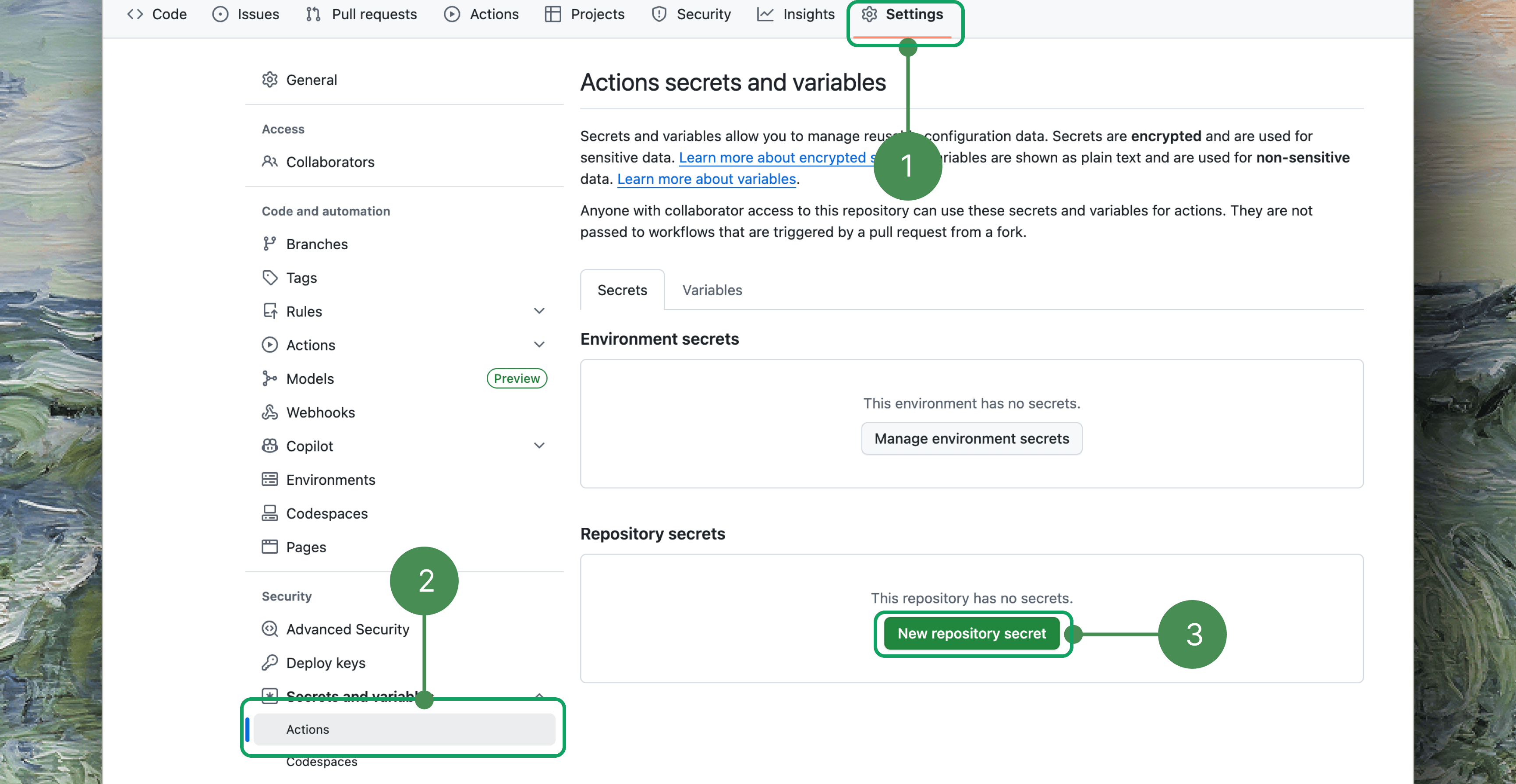 Then expose it to the job:
```yaml theme={null}
env:
TESTSPRITE_API_KEY: ${{ secrets.TESTSPRITE_API_KEY }}
```
The CLI resolves `TESTSPRITE_API_KEY` before the credentials file, so no `testsprite setup` step is needed in CI.
**Important:** Never inline an API key in a workflow file or a script committed to version control. Always source it from a secret store.
In most pipelines the env var alone is enough — you don't need to run any setup command. If you do need a credentials file on disk (for other tooling), write one non-interactively from the same env var with `--no-agent` to skip the skill install:
```bash theme={null}
testsprite setup --from-env --yes --no-agent
```
This reads `TESTSPRITE_API_KEY` from the environment, verifies the key, writes `~/.testsprite/credentials`, and prints an identity summary.
## Gating on the result
The CLI exits non-zero whenever a run does not pass — failed, blocked, cancelled, or timed out. Your shell or CI runner treats that as a job failure automatically.
```bash theme={null}
testsprite test run test_3a9f21c7 --wait --output json > result.json
# exit 0 = passed; any other exit fails the step
```
On failure you can pull the artifact before the job ends:
```bash theme={null}
testsprite test run test_3a9f21c7 --wait --output json > result.json || \
testsprite test failure get test_3a9f21c7 --out ./.testsprite/failure
```
## A GitHub Actions workflow
The example below runs all backend tests in a project on every pull request and fails the job if any test does not pass:
```yaml theme={null}
name: TestSprite
on:
pull_request:
jobs:
testsprite:
runs-on: ubuntu-latest
env:
TESTSPRITE_API_KEY: ${{ secrets.TESTSPRITE_API_KEY }}
PROJECT_ID: proj_8f0f6
steps:
- uses: actions/checkout@v4
- uses: actions/setup-node@v4
with:
node-version: 20
- name: Install TestSprite CLI
run: npm install -g @testsprite/testsprite-cli
- name: Run tests
run: |
testsprite test run --all --project "$PROJECT_ID" \
--wait --output json > result.json
- name: Download failure artifacts
if: failure()
run: |
testsprite test failure get \
"$(jq -r '.run.testId' result.json)" \
--out ./.testsprite/failure
- name: Upload failure bundle
if: failure()
uses: actions/upload-artifact@v4
with:
name: testsprite-failure
path: ./.testsprite/failure
```
`--all` runs every backend test in the project in wave order — producers first, teardown last — so dependencies are always satisfied. For frontend tests, pass an explicit `test-id` or loop over `testsprite test list --project "$PROJECT_ID" --output json`.
## Parsing JSON output
Pipe `--output json` to `jq` to extract fields for downstream steps:
```bash theme={null}
testsprite test run test_3a9f21c7 --wait --output json \
| jq '.run.status'
```
```text theme={null}
"passed"
```
Read the dashboard link for a PR comment or Slack notification:
```bash theme={null}
testsprite test run test_3a9f21c7 --wait --output json \
| jq -r '.run.dashboardUrl'
```
The top-level `run` object contains `status`, `runId`, `startedAt`, `finishedAt`, `codeVersion`, and `dashboardUrl` (when the backend returns a portal link).
## Rate limits and retries
The server caps run-triggers at **60 per minute per key**. The CLI throttles itself to **50 per minute** and automatically retries `RATE_LIMITED` responses, honoring the `Retry-After` header (capped at 3 retries).
For large batches, tune the in-flight concurrency:
```bash theme={null}
testsprite test run --all --project "$PROJECT_ID" \
--wait --max-concurrency 20
```
For slow networks or a slow first request, increase the per-request timeout:
```bash theme={null}
testsprite test run test_3a9f21c7 --wait \
--request-timeout 300
```
Reuse an `--idempotency-key` to make retries safe — if the server already accepted the request with that key, it returns the original response instead of triggering a duplicate run:
```bash theme={null}
testsprite test run test_3a9f21c7 --wait \
--idempotency-key "ci-run-${{ github.run_id }}-${{ github.run_attempt }}"
```
## Handling exit codes
The exit code is your primary signal. Two codes deserve special handling in a pipeline:
| Code | Meaning | Recommended action |
| :--- | :------------------- | :-------------------------------------------------------------------------------------------------------------- |
| `11` | Rate limited | Honor `Retry-After`; the CLI retries automatically, but if you hit it outside a run command, back off and retry |
| `12` | Insufficient credits | Non-retriable — top up your balance before re-queuing the job |
All other non-zero exits (auth error, test not found, network failure, test failed) should fail the job and surface the artifact.
The complete exit-code table
## Where to Go Next
Let your agent drive the verification loop without a human in the middle
All flags and modes for triggering and waiting on runs
Full exit-code table for branching your pipeline
Env vars, profiles, and per-request timeouts
Then expose it to the job:
```yaml theme={null}
env:
TESTSPRITE_API_KEY: ${{ secrets.TESTSPRITE_API_KEY }}
```
The CLI resolves `TESTSPRITE_API_KEY` before the credentials file, so no `testsprite setup` step is needed in CI.
**Important:** Never inline an API key in a workflow file or a script committed to version control. Always source it from a secret store.
In most pipelines the env var alone is enough — you don't need to run any setup command. If you do need a credentials file on disk (for other tooling), write one non-interactively from the same env var with `--no-agent` to skip the skill install:
```bash theme={null}
testsprite setup --from-env --yes --no-agent
```
This reads `TESTSPRITE_API_KEY` from the environment, verifies the key, writes `~/.testsprite/credentials`, and prints an identity summary.
## Gating on the result
The CLI exits non-zero whenever a run does not pass — failed, blocked, cancelled, or timed out. Your shell or CI runner treats that as a job failure automatically.
```bash theme={null}
testsprite test run test_3a9f21c7 --wait --output json > result.json
# exit 0 = passed; any other exit fails the step
```
On failure you can pull the artifact before the job ends:
```bash theme={null}
testsprite test run test_3a9f21c7 --wait --output json > result.json || \
testsprite test failure get test_3a9f21c7 --out ./.testsprite/failure
```
## A GitHub Actions workflow
The example below runs all backend tests in a project on every pull request and fails the job if any test does not pass:
```yaml theme={null}
name: TestSprite
on:
pull_request:
jobs:
testsprite:
runs-on: ubuntu-latest
env:
TESTSPRITE_API_KEY: ${{ secrets.TESTSPRITE_API_KEY }}
PROJECT_ID: proj_8f0f6
steps:
- uses: actions/checkout@v4
- uses: actions/setup-node@v4
with:
node-version: 20
- name: Install TestSprite CLI
run: npm install -g @testsprite/testsprite-cli
- name: Run tests
run: |
testsprite test run --all --project "$PROJECT_ID" \
--wait --output json > result.json
- name: Download failure artifacts
if: failure()
run: |
testsprite test failure get \
"$(jq -r '.run.testId' result.json)" \
--out ./.testsprite/failure
- name: Upload failure bundle
if: failure()
uses: actions/upload-artifact@v4
with:
name: testsprite-failure
path: ./.testsprite/failure
```
`--all` runs every backend test in the project in wave order — producers first, teardown last — so dependencies are always satisfied. For frontend tests, pass an explicit `test-id` or loop over `testsprite test list --project "$PROJECT_ID" --output json`.
## Parsing JSON output
Pipe `--output json` to `jq` to extract fields for downstream steps:
```bash theme={null}
testsprite test run test_3a9f21c7 --wait --output json \
| jq '.run.status'
```
```text theme={null}
"passed"
```
Read the dashboard link for a PR comment or Slack notification:
```bash theme={null}
testsprite test run test_3a9f21c7 --wait --output json \
| jq -r '.run.dashboardUrl'
```
The top-level `run` object contains `status`, `runId`, `startedAt`, `finishedAt`, `codeVersion`, and `dashboardUrl` (when the backend returns a portal link).
## Rate limits and retries
The server caps run-triggers at **60 per minute per key**. The CLI throttles itself to **50 per minute** and automatically retries `RATE_LIMITED` responses, honoring the `Retry-After` header (capped at 3 retries).
For large batches, tune the in-flight concurrency:
```bash theme={null}
testsprite test run --all --project "$PROJECT_ID" \
--wait --max-concurrency 20
```
For slow networks or a slow first request, increase the per-request timeout:
```bash theme={null}
testsprite test run test_3a9f21c7 --wait \
--request-timeout 300
```
Reuse an `--idempotency-key` to make retries safe — if the server already accepted the request with that key, it returns the original response instead of triggering a duplicate run:
```bash theme={null}
testsprite test run test_3a9f21c7 --wait \
--idempotency-key "ci-run-${{ github.run_id }}-${{ github.run_attempt }}"
```
## Handling exit codes
The exit code is your primary signal. Two codes deserve special handling in a pipeline:
| Code | Meaning | Recommended action |
| :--- | :------------------- | :-------------------------------------------------------------------------------------------------------------- |
| `11` | Rate limited | Honor `Retry-After`; the CLI retries automatically, but if you hit it outside a run command, back off and retry |
| `12` | Insufficient credits | Non-retriable — top up your balance before re-queuing the job |
All other non-zero exits (auth error, test not found, network failure, test failed) should fail the job and surface the artifact.
The complete exit-code table
## Where to Go Next
Let your agent drive the verification loop without a human in the middle
All flags and modes for triggering and waiting on runs
Full exit-code table for branching your pipeline
Env vars, profiles, and per-request timeouts