> ## Documentation Index
> Fetch the complete documentation index at: https://docs.testsprite.com/llms.txt
> Use this file to discover all available pages before exploring further.
# Create Tests for New Change
> Generate tests scoped to recent code changes using TestSprite MCP Server.
## When to Use This
Use this flow after making a change (feature, bugfix, refactor). It targets only impacted areas to keep feedback fast.
Shift Left: You can generate and run tests even before a feature is complete to surface gaps early. Use `testScope: "diff"` and run a small subset (`testIds`) frequently during development.
## Prerequisites
* TestSprite MCP [Installed and configured](/mcp/getting-started/installation) in your IDE
* Your application runs locally
* Git repo with recent commits for diff analysis
## Quick Start
```text theme={null}
Test my new changes related to the Stripe payment features.
```
## Diff-Scoped Testing Workflow
TestSprite's diff-scoped workflow is optimized for speed and precision, focusing only on code impacted by recent changes:
```mermaid theme={null}
flowchart LR
A["Bootstrap (diff scope)
Analyze recent changes"] --> B["Analyze Changed Code
Understand impacted features"]
B --> C["Update/Generate PRD
Align with new requirements"]
C --> D["Create Targeted Tests
Focus on changed flows"]
D --> E["Generate & Execute
Quick feedback loop"]
E --> F["Review Results
Fix and iterate"]
```
### Step 1: Bootstrap with Diff Scope
The AI calls `testsprite_bootstrap_tests` with `testScope: "diff"` to initialize testing for changed code only.
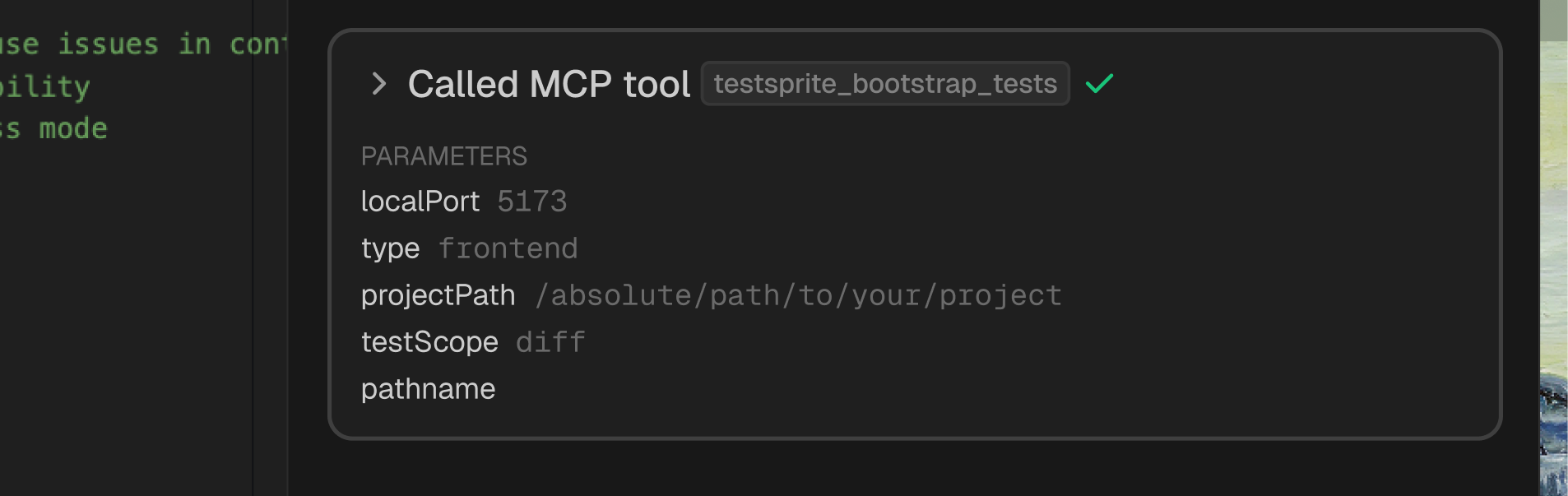
1. **Project Detection**: Reuses existing project type configuration (`frontend` or `backend`)
2. **Port Discovery**: Finds running applications and their ports
3. **Git Diff Analysis**: Identifies modified files and changed lines since last commit
4. **Scope Definition**: Sets testing scope to `diff` (changed code only)
* **Faster Setup**: Reuses existing project configuration from previous runs
* **Git Integration**: Analyzes your recent commits to identify changes
* **Smart Filtering**: Only considers files and features touched by your commits
* **Quick Validation**: Perfect for iterative development and PR workflows
```javascript Configuration expandable theme={null}
testsprite_bootstrap_tests({
localPort: 5173, // or your port
type: "frontend", // or "backend"
projectPath: "/absolute/path/to/your/project",
testScope: "diff" // analyze only recent changes
})
```
```json Sample Configuration expandable theme={null}
{
"projectType": "frontend",
"localPort": 5173,
"testScope": "diff",
"needLogin": true,
"credentials": {
"username": "test@example.com",
"password": "testpassword123"
}
}
```
### Step 2: Analyze Changed Code
The AI calls `testsprite_generate_code_summary` to analyze only the code impacted by your changes.
 **Diff-Aware Analysis:**
1. **Change Detection**: Focuses on modified files and their dependencies
2. **Impact Mapping**: Identifies affected features and components
3. **Dependency Tracking**: Detects new dependencies or framework changes
4. **Coverage Assessment**: Maps changes to existing test coverage gaps
```javascript Tool Call theme={null}
testsprite_generate_code_summary({
projectRootPath: "/absolute/path/to/your/project"
})
```
```json Expandable Example Output for Changed Feature expandable theme={null}
{
"changed_features": [
{
"name": "Stripe Payment Integration",
"description": "New payment flow with Stripe checkout",
"files": [
"src/components/Checkout.tsx",
"src/api/payments.ts"
],
"impact": "High - affects checkout flow and payment processing"
}
],
"dependencies_added": ["@stripe/stripe-js", "@stripe/react-stripe-js"],
"files_changed": 2,
"lines_added": 165,
"lines_removed": 12
}
```
### Step 3: Generate/Update Normalized PRD
The AI calls `testsprite_generate_standardized_prd` to update requirements based on code changes.
**Diff-Aware Analysis:**
1. **Change Detection**: Focuses on modified files and their dependencies
2. **Impact Mapping**: Identifies affected features and components
3. **Dependency Tracking**: Detects new dependencies or framework changes
4. **Coverage Assessment**: Maps changes to existing test coverage gaps
```javascript Tool Call theme={null}
testsprite_generate_code_summary({
projectRootPath: "/absolute/path/to/your/project"
})
```
```json Expandable Example Output for Changed Feature expandable theme={null}
{
"changed_features": [
{
"name": "Stripe Payment Integration",
"description": "New payment flow with Stripe checkout",
"files": [
"src/components/Checkout.tsx",
"src/api/payments.ts"
],
"impact": "High - affects checkout flow and payment processing"
}
],
"dependencies_added": ["@stripe/stripe-js", "@stripe/react-stripe-js"],
"files_changed": 2,
"lines_added": 165,
"lines_removed": 12
}
```
### Step 3: Generate/Update Normalized PRD
The AI calls `testsprite_generate_standardized_prd` to update requirements based on code changes.
 **PRD Update Process:**
1. **Merge Changes**: Integrates new features into existing PRD
2. **Update Requirements**: Adjusts validation criteria for modified flows
3. **Maintain Context**: Preserves overall product goals and existing features
4. **Focus on Delta**: Emphasizes what changed rather than rewriting everything
```javascript Tool Called theme={null}
testsprite_generate_standardized_prd({
projectPath: "/absolute/path/to/your/project"
})
```
For minor changes (bug fixes, small refactors), this step may be skipped to save time. For new features or significant changes, it ensures test requirements are aligned with your updates.
### Step 4: Create Targeted Test Plans
The AI calls `testsprite_generate_frontend_test_plan` or `testsprite_generate_backend_test_plan` based on what changed.
**PRD Update Process:**
1. **Merge Changes**: Integrates new features into existing PRD
2. **Update Requirements**: Adjusts validation criteria for modified flows
3. **Maintain Context**: Preserves overall product goals and existing features
4. **Focus on Delta**: Emphasizes what changed rather than rewriting everything
```javascript Tool Called theme={null}
testsprite_generate_standardized_prd({
projectPath: "/absolute/path/to/your/project"
})
```
For minor changes (bug fixes, small refactors), this step may be skipped to save time. For new features or significant changes, it ensures test requirements are aligned with your updates.
### Step 4: Create Targeted Test Plans
The AI calls `testsprite_generate_frontend_test_plan` or `testsprite_generate_backend_test_plan` based on what changed.
 **Test Plan Focus:**
* **Targeted Coverage**: Tests only impacted features and their dependencies
* **Regression Detection**: Validates that existing flows still work
* **New Functionality**: Ensures new features work as expected
* **Edge Cases**: Covers boundary conditions in changed code
```javascript Frontend UI/Business Flows expandable theme={null}
// Covers: UI changes and new components, modified user flows and journeys,
// updated form validations, changed authentication logic
testsprite_generate_frontend_test_plan({
projectPath: "/absolute/path/to/your/project",
needLogin: true
})
```
```javascript Backend API/Integration theme={null}
// Covers: New or modified API endpoints, changed request/response contracts,
// updated business logic, modified integrations and dependencies
testsprite_generate_backend_test_plan({
projectPath: "/absolute/path/to/your/project"
})
```
```json Expandable Example Targeted Test Plan expandable theme={null}
[
{
"id": "TC_DIFF_001",
"title": "Stripe checkout initiates payment successfully",
"description": "Verify new Stripe payment integration works end-to-end",
"category": "functional",
"priority": "High",
"reason": "New feature in current diff",
"steps": [
{
"type": "action",
"description": "Add items to cart and proceed to checkout"
},
{
"type": "action",
"description": "Click 'Pay with Stripe' button"
},
{
"type": "assertion",
"description": "Verify Stripe payment modal opens"
},
{
"type": "action",
"description": "Complete test payment with Stripe test card"
},
{
"type": "assertion",
"description": "Verify payment confirmation and order success"
}
]
}
]
```
### Step 5: Generate & Execute Focused Tests
The AI calls `testsprite_generate_code_and_execute` to create and run tests for impacted areas only.
**Test Plan Focus:**
* **Targeted Coverage**: Tests only impacted features and their dependencies
* **Regression Detection**: Validates that existing flows still work
* **New Functionality**: Ensures new features work as expected
* **Edge Cases**: Covers boundary conditions in changed code
```javascript Frontend UI/Business Flows expandable theme={null}
// Covers: UI changes and new components, modified user flows and journeys,
// updated form validations, changed authentication logic
testsprite_generate_frontend_test_plan({
projectPath: "/absolute/path/to/your/project",
needLogin: true
})
```
```javascript Backend API/Integration theme={null}
// Covers: New or modified API endpoints, changed request/response contracts,
// updated business logic, modified integrations and dependencies
testsprite_generate_backend_test_plan({
projectPath: "/absolute/path/to/your/project"
})
```
```json Expandable Example Targeted Test Plan expandable theme={null}
[
{
"id": "TC_DIFF_001",
"title": "Stripe checkout initiates payment successfully",
"description": "Verify new Stripe payment integration works end-to-end",
"category": "functional",
"priority": "High",
"reason": "New feature in current diff",
"steps": [
{
"type": "action",
"description": "Add items to cart and proceed to checkout"
},
{
"type": "action",
"description": "Click 'Pay with Stripe' button"
},
{
"type": "assertion",
"description": "Verify Stripe payment modal opens"
},
{
"type": "action",
"description": "Complete test payment with Stripe test card"
},
{
"type": "assertion",
"description": "Verify payment confirmation and order success"
}
]
}
]
```
### Step 5: Generate & Execute Focused Tests
The AI calls `testsprite_generate_code_and_execute` to create and run tests for impacted areas only.
 1. **Incremental Generation**: Creates or updates only tests for changed features
2. **Smart Reuse**: Leverages existing test utilities and helpers
3. **Focused Execution**: Runs only tests that could be affected by changes
4. **Fast Feedback**: Completes in 3-5 minutes vs 10-20 minutes for full suite
* **Faster Runs**: Typically 3-5x faster than full `codebase` scope
* **Immediate Feedback**: Quick validation of your changes
* **Focused Reports**: Clear signal on what your change broke or fixed
* **Iterative Development**: Run frequently during development
```javascript Tool Call expandable theme={null}
testsprite_generate_code_and_execute({
projectName: "your-project-name",
projectPath: "/absolute/path/to/your/project",
testIds: [], // empty = all diff-scoped tests
additionalInstruction: "Focus only on changed modules and impacted flows"
})
```
#### Performance Comparison
| Scope | Typical Test Count | Execution Time | Use Case |
| ---------- | ------------------ | -------------- | --------------------------------- |
| `codebase` | 20-50 tests | 10-20 min | Initial setup, major releases |
| `diff` | 3-10 tests | 3-5 min | During development, PR validation |
### Step 6: Review Diff-Focused Results
TestSprite provides targeted reports showing exactly what your changes affected:
**Report Highlights:**
* **Changed Features Status**: Did your changes work as expected?
* **Regression Detection**: Did your changes break existing flows?
* **New Test Coverage**: What new scenarios are now tested?
* **Healing Suggestions**: Any brittleness introduced by changes?
**Your Changes:**
* Modified `src/components/Checkout.tsx` (+45, -12)
* Added `src/api/payments.ts` (+120)
* Updated `package.json` (added Stripe dependencies)
**Test Results:**
* ✅ **3 new tests passed** - Stripe payment flow works correctly
* ⚠️ **1 test needs update** - Checkout button selector changed
* ✅ **5 existing tests passed** - No regressions detected
**Recommendations:**
* Update test selector for new checkout button class
* Consider adding test for payment failure scenarios
* All critical paths validated successfully
## Best Practices for Diff-Scoped Testing
✅ **Good Use Cases:**
* During active feature development
* After bug fixes or refactors
* Before committing changes
* In PR validation workflows
❌ **When to Use Codebase Scope Instead:**
* Initial project onboarding
* Major refactors affecting many files
* Pre-release validation
* When test plan doesn't exist yet
* **Commit frequently** - Accurate diffs require clean git state
* **Run subset first** - Use `testIds` to test critical paths quickly
* **Iterate fast** - Run diff tests every 15-30 minutes during dev
* **Fix as you go** - Address failures immediately while context is fresh
* Start with empty `testIds: []` to run all diff-scoped tests
* Use specific `testIds: ["TC_001", "TC_005"]` for rapid iteration
* Add `additionalInstruction` to guide test generation context
* Keep PRD updated if feature requirements changed
## Shift-Left Testing Workflow
TestSprite enables true shift-left testing - run tests early and often, even on incomplete code:
Begin implementing your feature or fix
Run diff-scoped tests even if feature isn't complete. Ask your AI assistant: "Test my in-progress payment feature changes"
Outcome: Discover missing validations, edge cases, UX gaps early
Address gaps found by tests, continue coding
Run again when feature is ready
Outcome: High confidence your change works correctly
Commit knowing your change is thoroughly tested
## Next Steps
Adjust existing test plans
Full codebase testing workflow
CI/CD integration
Understand test triggers
Auto-repair brittle tests
1. **Incremental Generation**: Creates or updates only tests for changed features
2. **Smart Reuse**: Leverages existing test utilities and helpers
3. **Focused Execution**: Runs only tests that could be affected by changes
4. **Fast Feedback**: Completes in 3-5 minutes vs 10-20 minutes for full suite
* **Faster Runs**: Typically 3-5x faster than full `codebase` scope
* **Immediate Feedback**: Quick validation of your changes
* **Focused Reports**: Clear signal on what your change broke or fixed
* **Iterative Development**: Run frequently during development
```javascript Tool Call expandable theme={null}
testsprite_generate_code_and_execute({
projectName: "your-project-name",
projectPath: "/absolute/path/to/your/project",
testIds: [], // empty = all diff-scoped tests
additionalInstruction: "Focus only on changed modules and impacted flows"
})
```
#### Performance Comparison
| Scope | Typical Test Count | Execution Time | Use Case |
| ---------- | ------------------ | -------------- | --------------------------------- |
| `codebase` | 20-50 tests | 10-20 min | Initial setup, major releases |
| `diff` | 3-10 tests | 3-5 min | During development, PR validation |
### Step 6: Review Diff-Focused Results
TestSprite provides targeted reports showing exactly what your changes affected:
**Report Highlights:**
* **Changed Features Status**: Did your changes work as expected?
* **Regression Detection**: Did your changes break existing flows?
* **New Test Coverage**: What new scenarios are now tested?
* **Healing Suggestions**: Any brittleness introduced by changes?
**Your Changes:**
* Modified `src/components/Checkout.tsx` (+45, -12)
* Added `src/api/payments.ts` (+120)
* Updated `package.json` (added Stripe dependencies)
**Test Results:**
* ✅ **3 new tests passed** - Stripe payment flow works correctly
* ⚠️ **1 test needs update** - Checkout button selector changed
* ✅ **5 existing tests passed** - No regressions detected
**Recommendations:**
* Update test selector for new checkout button class
* Consider adding test for payment failure scenarios
* All critical paths validated successfully
## Best Practices for Diff-Scoped Testing
✅ **Good Use Cases:**
* During active feature development
* After bug fixes or refactors
* Before committing changes
* In PR validation workflows
❌ **When to Use Codebase Scope Instead:**
* Initial project onboarding
* Major refactors affecting many files
* Pre-release validation
* When test plan doesn't exist yet
* **Commit frequently** - Accurate diffs require clean git state
* **Run subset first** - Use `testIds` to test critical paths quickly
* **Iterate fast** - Run diff tests every 15-30 minutes during dev
* **Fix as you go** - Address failures immediately while context is fresh
* Start with empty `testIds: []` to run all diff-scoped tests
* Use specific `testIds: ["TC_001", "TC_005"]` for rapid iteration
* Add `additionalInstruction` to guide test generation context
* Keep PRD updated if feature requirements changed
## Shift-Left Testing Workflow
TestSprite enables true shift-left testing - run tests early and often, even on incomplete code:
Begin implementing your feature or fix
Run diff-scoped tests even if feature isn't complete. Ask your AI assistant: "Test my in-progress payment feature changes"
Outcome: Discover missing validations, edge cases, UX gaps early
Address gaps found by tests, continue coding
Run again when feature is ready
Outcome: High confidence your change works correctly
Commit knowing your change is thoroughly tested
## Next Steps
Adjust existing test plans
Full codebase testing workflow
CI/CD integration
Understand test triggers
Auto-repair brittle tests