> ## Documentation Index
> Fetch the complete documentation index at: https://docs.testsprite.com/llms.txt
> Use this file to discover all available pages before exploring further.

# Overview

> The No-Code, No-Prompt Testing Agent That Makes Your Software Work

## What is TestSprite MCP Server?

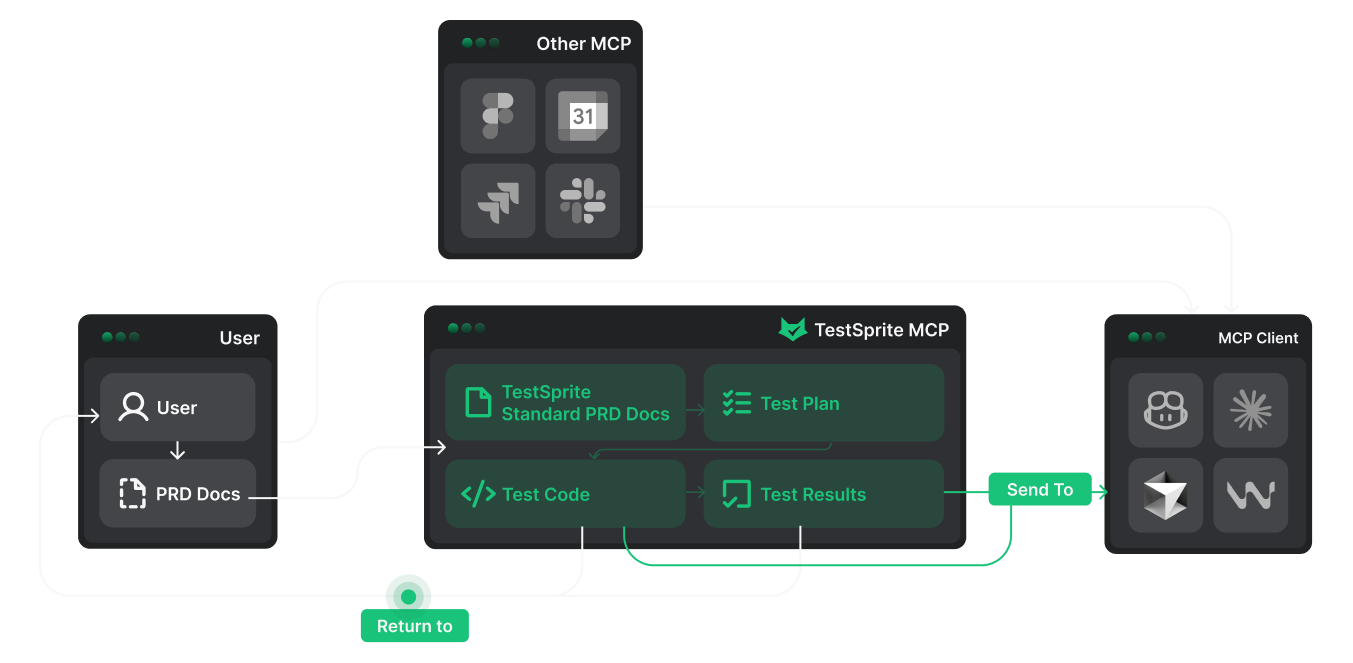
TestSprite MCP Server is a
<Tooltip tip="an open-source standard for connecting AI applications to external systems." cta="Learn more about MCP" href="https://modelcontextprotocol.io/">Model Context Protocol</Tooltip>
integration that connects your IDE's AI assistant (like Cursor or Windsurf) with TestSprite's intelligent testing engine. It enables **fully automated testing workflows** directly within your development environment.
<Frame>
  <img src="https://mintcdn.com/testspriteinc/ex3lblqbetJSa-ak/images/mcp-flow.png?fit=max&auto=format&n=ex3lblqbetJSa-ak&q=85&s=50f3716d6c249a6b4c4d4a61d185971b" alt="mcp flow" width="1353" height="663" data-path="images/mcp-flow.png" />
</Frame>

## How It Works

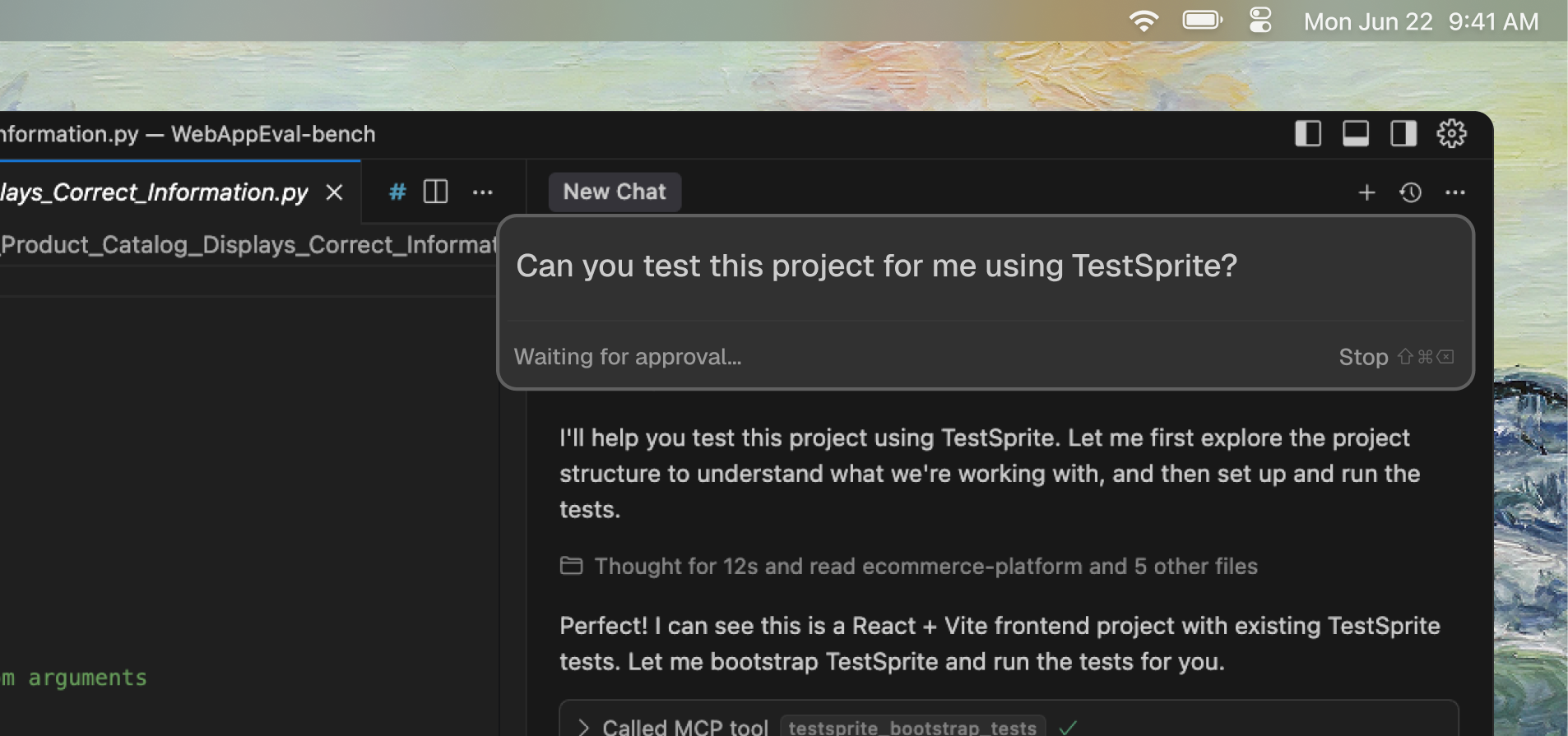
After installing TestSprite MCP in your IDE, you can use simple **natural language prompts** to let our AI testing agent handle the entire testing workflow for you.
<Frame>
  <img src="https://mintcdn.com/testspriteinc/etE5QHi14YOHx37z/images/mcp-intro.png?fit=max&auto=format&n=etE5QHi14YOHx37z&q=85&s=c851385087e2e82dcd07c301623c4fe0" alt="mcp intro" width="1906" height="895" data-path="images/mcp-intro.png" />
</Frame>

Just use the following prompt, drag your project folder into the chat, or describe your testing requirements. TestSprite MCP Server handles the rest.

```text icon="file-lines" theme={null}
Help me test this project with TestSprite.
```

<Accordion title="How TestSprite Works in 8 Simple Steps">
  <Steps>
    <Step title="Reads User PRD">
      Understands your product requirements and goals.
    </Step>

    <Step title="Analyzes Your Code">
      Scans project structure, features, and implementation.
    </Step>

    <Step title="Generates TestSprite PRD">
      Creates normalized product requirements document.
    </Step>

    <Step title="Creates Test Plans">
      Generates comprehensive test cases based on PRD and code.
    </Step>

    <Step title="Generates Test Code">
      Creates executable test scripts (Playwright, Cypress, etc.).
    </Step>

    <Step title="Executes Tests">
      Runs tests in secure cloud environments.
    </Step>

    <Step title="Provides Results">
      Delivers detailed reports with actionable insights.
    </Step>

    <Step title="Enables Fixes">
      IDE uses our analysis to automatically patch issues.
    </Step>
  </Steps>
</Accordion>

## Key Benefits

Depending on your role, TestSprite MCP Server delivers different advantages:

* **For Developers:** Ship faster with **zero test writing**, get **feedback in minutes** (not hours), and **fix issues automatically** with AI-powered analysis—all **without leaving your IDE**.

* **For Teams:** Achieve **predictable quality** and **faster releases** with **broad, consistent coverage**—including edge cases—while reducing manual QA effort and test maintenance overhead.

## What Makes It Different

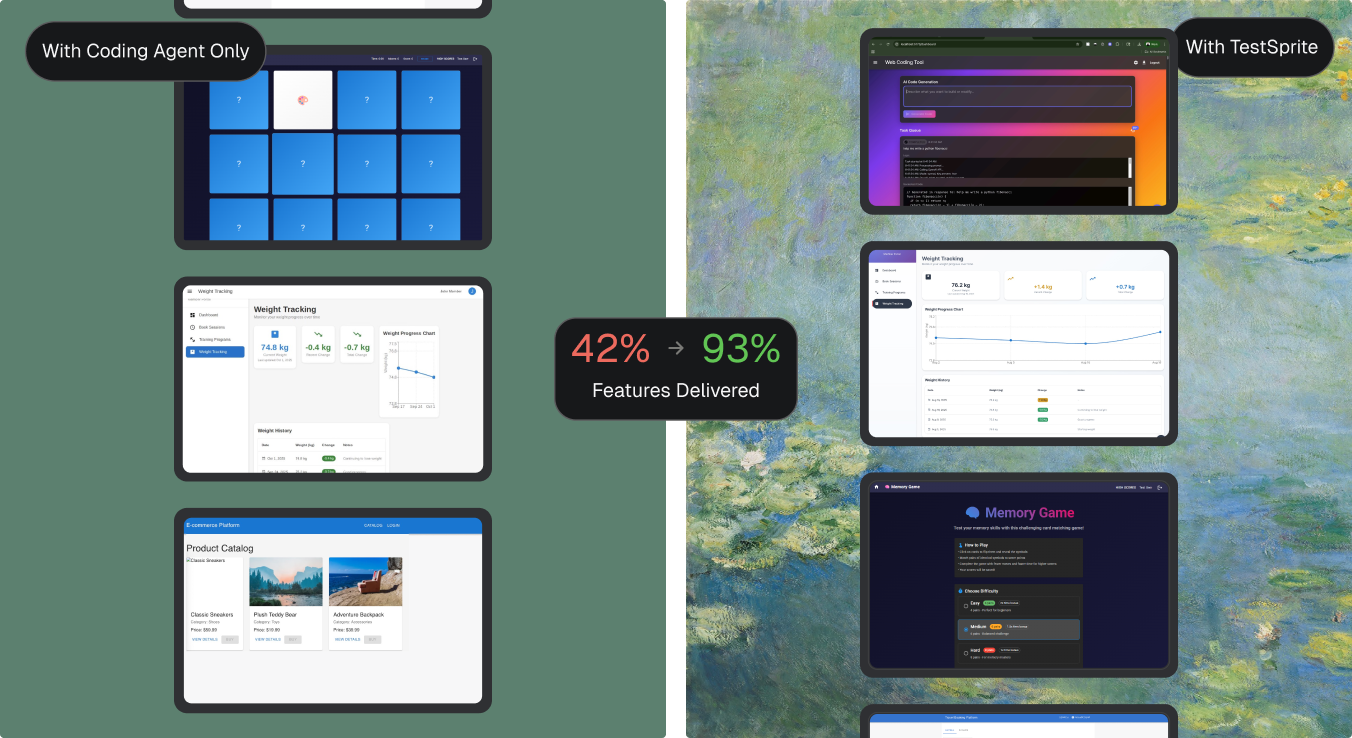
TestSprite MCP Server transforms the testing experience by automating what traditionally requires manual effort. Here's how it compares to traditional testing approaches:
<Frame>
  <img src="https://mintcdn.com/testspriteinc/yJGuYRYLVPSec7Ng/images/real-result.png?fit=max&auto=format&n=yJGuYRYLVPSec7Ng&q=85&s=d3fd66f4f1f445e7ef2e9604e9afe0c1" alt="result" width="1352" height="738" data-path="images/real-result.png" />
</Frame>

| Features                      | Traditional Testing                                  | TestSprite MCP Server                     |
| :---------------------------- | :--------------------------------------------------- | :---------------------------------------- |
| <kbd>Test case creation</kbd> | Writing test cases manually                          | **AI generates test cases automatically** |
| <kbd>Setup</kbd>              | Setting up complex frameworks                        | Almost **zero setup required**            |
| <kbd>Debugging</kbd>          | Debugging failures by hand                           | **Analyzes and fixes issues** for you     |
| <kbd>Integration</kbd>        | Running tests separately from development            | **Integrated into your coding workflow**  |
| <kbd>Coverage</kbd>           | **Limited coverage** that misses critical edge cases | **Comprehensive automated coverage**      |

## Testing Capabilities

TestSprite MCP Server supports comprehensive testing for both frontend and backend applications, from UI flows to API integrations and security validation.

<Tabs>
  <Tab title="Frontend Testing (Business-Flow E2E)">
    * User Journey Navigation
    * Form Flows & Validation
    * Visual States & Layouts
    * Interactive Components & Stateful UI
    * Authorization & Auth Flows
    * Error Handling (UI)
  </Tab>

  <Tab title="Backend Testing (API & Integration)">
    * Functional API Workflows
    * Contract & Schema Validation
    * Error Handling & Resilience
    * Authorization & Authentication
    * Boundary & Edge Cases
    * Data Integrity & Persistence
    * Security Testing
  </Tab>
</Tabs>

## Supported Technologies

<Tabs>
  <Tab title="Frontend Frameworks" icon="code">
    <Columns cols={3}>
      <Card title="React">
        <div style={{ display: 'flex', alignItems: 'flex-start', justifyContent: 'flex-start', paddingTop: '8px' }}>
          <img src="https://mintcdn.com/testspriteinc/trKB4znBfu6gTmSI/decorationAssets/react.png?fit=max&auto=format&n=trKB4znBfu6gTmSI&q=85&s=663e059ec7f4a6248339b1e9aa87a217" alt="React" style={{ width: '32px', height: '32px' }} width="600" height="600" data-path="decorationAssets/react.png" />
        </div>
      </Card>

      <Card title="Vue">
        <div style={{ display: 'flex', alignItems: 'flex-start', justifyContent: 'flex-start', paddingTop: '8px' }}>
          <img src="https://mintcdn.com/testspriteinc/trKB4znBfu6gTmSI/decorationAssets/vue.png?fit=max&auto=format&n=trKB4znBfu6gTmSI&q=85&s=224ff6e2288b2cdd0a8df095027f865f" alt="Vue" style={{ width: '32px', height: '32px' }} width="600" height="600" data-path="decorationAssets/vue.png" />
        </div>
      </Card>

      <Card title="Angular">
        <div style={{ display: 'flex', alignItems: 'flex-start', justifyContent: 'flex-start', paddingTop: '8px' }}>
          <img src="https://mintcdn.com/testspriteinc/trKB4znBfu6gTmSI/decorationAssets/angular.png?fit=max&auto=format&n=trKB4znBfu6gTmSI&q=85&s=cef2a651be51fb27862d1ecd82e04b61" alt="Angular" style={{ width: '32px', height: '32px' }} width="600" height="600" data-path="decorationAssets/angular.png" />
        </div>
      </Card>

      <Card title="Svelte">
        <div style={{ display: 'flex', alignItems: 'flex-start', justifyContent: 'flex-start', paddingTop: '8px' }}>
          <img src="https://mintcdn.com/testspriteinc/trKB4znBfu6gTmSI/decorationAssets/Svelte.png?fit=max&auto=format&n=trKB4znBfu6gTmSI&q=85&s=5ad8c6ddc31bb869b0af9a00a85116af" alt="Svelte" style={{ width: '32px', height: '32px' }} width="600" height="600" data-path="decorationAssets/Svelte.png" />
        </div>
      </Card>

      <Card title="Next.js">
        <div style={{ display: 'flex', alignItems: 'flex-start', justifyContent: 'flex-start', paddingTop: '8px' }}>
          <img src="https://mintcdn.com/testspriteinc/trKB4znBfu6gTmSI/decorationAssets/next.png?fit=max&auto=format&n=trKB4znBfu6gTmSI&q=85&s=8af0e2e65df70006a3b1150c255f33a6" alt="Next.js" style={{ width: '32px', height: '32px' }} width="600" height="600" data-path="decorationAssets/next.png" />
        </div>
      </Card>

      <Card title="Vite">
        <div style={{ display: 'flex', alignItems: 'flex-start', justifyContent: 'flex-start', paddingTop: '8px' }}>
          <img src="https://mintcdn.com/testspriteinc/trKB4znBfu6gTmSI/decorationAssets/vite.png?fit=max&auto=format&n=trKB4znBfu6gTmSI&q=85&s=6d26c537fbb1efeabd4e856a72072de3" alt="Vite" style={{ width: '32px', height: '32px' }} width="600" height="600" data-path="decorationAssets/vite.png" />
        </div>
      </Card>

      <Card title="Vanilla JavaScript/TypeScript">
        <div style={{ display: 'flex', alignItems: 'flex-start', justifyContent: 'flex-start', paddingTop: '8px' }}>
          <img src="https://mintcdn.com/testspriteinc/trKB4znBfu6gTmSI/decorationAssets/vanila.png?fit=max&auto=format&n=trKB4znBfu6gTmSI&q=85&s=fcf193e9a4eff176fbb7ec08b31c1647" alt="Vanilla JS/TS" style={{ width: '32px', height: '32px' }} width="600" height="600" data-path="decorationAssets/vanila.png" />
        </div>
      </Card>
    </Columns>
  </Tab>

  <Tab title="Backend Technologies" icon="server">
    <Columns cols={3}>
      <Card title="Node.js">
        <div style={{ display: 'flex', alignItems: 'flex-start', justifyContent: 'flex-start', paddingTop: '8px' }}>
          <img src="https://mintcdn.com/testspriteinc/trKB4znBfu6gTmSI/decorationAssets/node.png?fit=max&auto=format&n=trKB4znBfu6gTmSI&q=85&s=4ea125a8f15685db2f29506743889dd9" alt="Node.js" style={{ width: '32px', height: '32px' }} width="600" height="600" data-path="decorationAssets/node.png" />
        </div>
      </Card>

      <Card title="Python">
        <div style={{ display: 'flex', alignItems: 'flex-start', justifyContent: 'flex-start', paddingTop: '8px' }}>
          <img src="https://mintcdn.com/testspriteinc/trKB4znBfu6gTmSI/decorationAssets/python.png?fit=max&auto=format&n=trKB4znBfu6gTmSI&q=85&s=e161ff23927be59c6cfc5e695b6077b9" alt="Python" style={{ width: '32px', height: '32px' }} width="600" height="600" data-path="decorationAssets/python.png" />
        </div>
      </Card>

      <Card title="Java">
        <div style={{ display: 'flex', alignItems: 'flex-start', justifyContent: 'flex-start', paddingTop: '8px' }}>
          <img src="https://mintcdn.com/testspriteinc/trKB4znBfu6gTmSI/decorationAssets/java.png?fit=max&auto=format&n=trKB4znBfu6gTmSI&q=85&s=6c3f6f63ec2a85559416a3b6bd7f499b" alt="Java" style={{ width: '32px', height: '32px' }} width="600" height="600" data-path="decorationAssets/java.png" />
        </div>
      </Card>

      <Card title="Go">
        <div style={{ display: 'flex', alignItems: 'flex-start', justifyContent: 'flex-start', paddingTop: '8px' }}>
          <img src="https://mintcdn.com/testspriteinc/trKB4znBfu6gTmSI/decorationAssets/go.png?fit=max&auto=format&n=trKB4znBfu6gTmSI&q=85&s=51a667f9cc762502bbecc277b2ceba8d" alt="Go" style={{ width: '32px', height: '32px' }} width="600" height="600" data-path="decorationAssets/go.png" />
        </div>
      </Card>

      <Card title="Express.js">
        <div style={{ display: 'flex', alignItems: 'flex-start', justifyContent: 'flex-start', paddingTop: '8px' }}>
          <img src="https://mintcdn.com/testspriteinc/trKB4znBfu6gTmSI/decorationAssets/express.png?fit=max&auto=format&n=trKB4znBfu6gTmSI&q=85&s=ba9333aaa42b854c75ce3133e2e8109d" alt="Express.js" style={{ width: '32px', height: '32px' }} width="600" height="600" data-path="decorationAssets/express.png" />
        </div>
      </Card>

      <Card title="FastAPI">
        <div style={{ display: 'flex', alignItems: 'flex-start', justifyContent: 'flex-start', paddingTop: '8px' }}>
          <img src="https://mintcdn.com/testspriteinc/trKB4znBfu6gTmSI/decorationAssets/fast.png?fit=max&auto=format&n=trKB4znBfu6gTmSI&q=85&s=dda10c4443fa02b013d94523ffeccc3c" alt="FastAPI" style={{ width: '32px', height: '32px' }} width="600" height="600" data-path="decorationAssets/fast.png" />
        </div>
      </Card>

      <Card title="Spring Boot">
        <div style={{ display: 'flex', alignItems: 'flex-start', justifyContent: 'flex-start', paddingTop: '8px' }}>
          <img src="https://mintcdn.com/testspriteinc/trKB4znBfu6gTmSI/decorationAssets/spring.png?fit=max&auto=format&n=trKB4znBfu6gTmSI&q=85&s=36fd8231b70b1822a62c4a45a7ba9a48" alt="Spring Boot" style={{ width: '32px', height: '32px' }} width="600" height="600" data-path="decorationAssets/spring.png" />
        </div>
      </Card>

      <Card title="REST APIs">
        <div style={{ display: 'flex', alignItems: 'flex-start', justifyContent: 'flex-start', paddingTop: '8px' }}>
          <img src="https://mintcdn.com/testspriteinc/trKB4znBfu6gTmSI/decorationAssets/rest.png?fit=max&auto=format&n=trKB4znBfu6gTmSI&q=85&s=9a75f34a4401acb6e51eba4500f0d729" alt="REST APIs" style={{ width: '32px', height: '32px' }} width="600" height="600" data-path="decorationAssets/rest.png" />
        </div>
      </Card>

      <Card title="GraphQL">
        <div style={{ display: 'flex', alignItems: 'flex-start', justifyContent: 'flex-start', paddingTop: '8px' }}>
          <img src="https://mintcdn.com/testspriteinc/trKB4znBfu6gTmSI/decorationAssets/GraphQL.png?fit=max&auto=format&n=trKB4znBfu6gTmSI&q=85&s=d9d0771ad56bfbeb101de463eb6757d4" alt="GraphQL" style={{ width: '32px', height: '32px' }} width="600" height="600" data-path="decorationAssets/GraphQL.png" />
        </div>
      </Card>
    </Columns>
  </Tab>
</Tabs>

## Real Results

TestSprite MCP Server delivers measurable improvements:

* **90%+ Code Quality** - Achieve professional-grade code quality
* **10x Faster Testing** - From hours to minutes
* **Zero Learning Curve** - No testing expertise required
* **Automatic Bug Fixes** - AI patches issues automatically