> ## Documentation Index
> Fetch the complete documentation index at: https://docs.testsprite.com/llms.txt
> Use this file to discover all available pages before exploring further.
# Plan Generation & Editing
> How TestSprite turns explored features into a UI test plan grounded in real observed flows — and how to review, prune, refine, and add to it before generation runs.
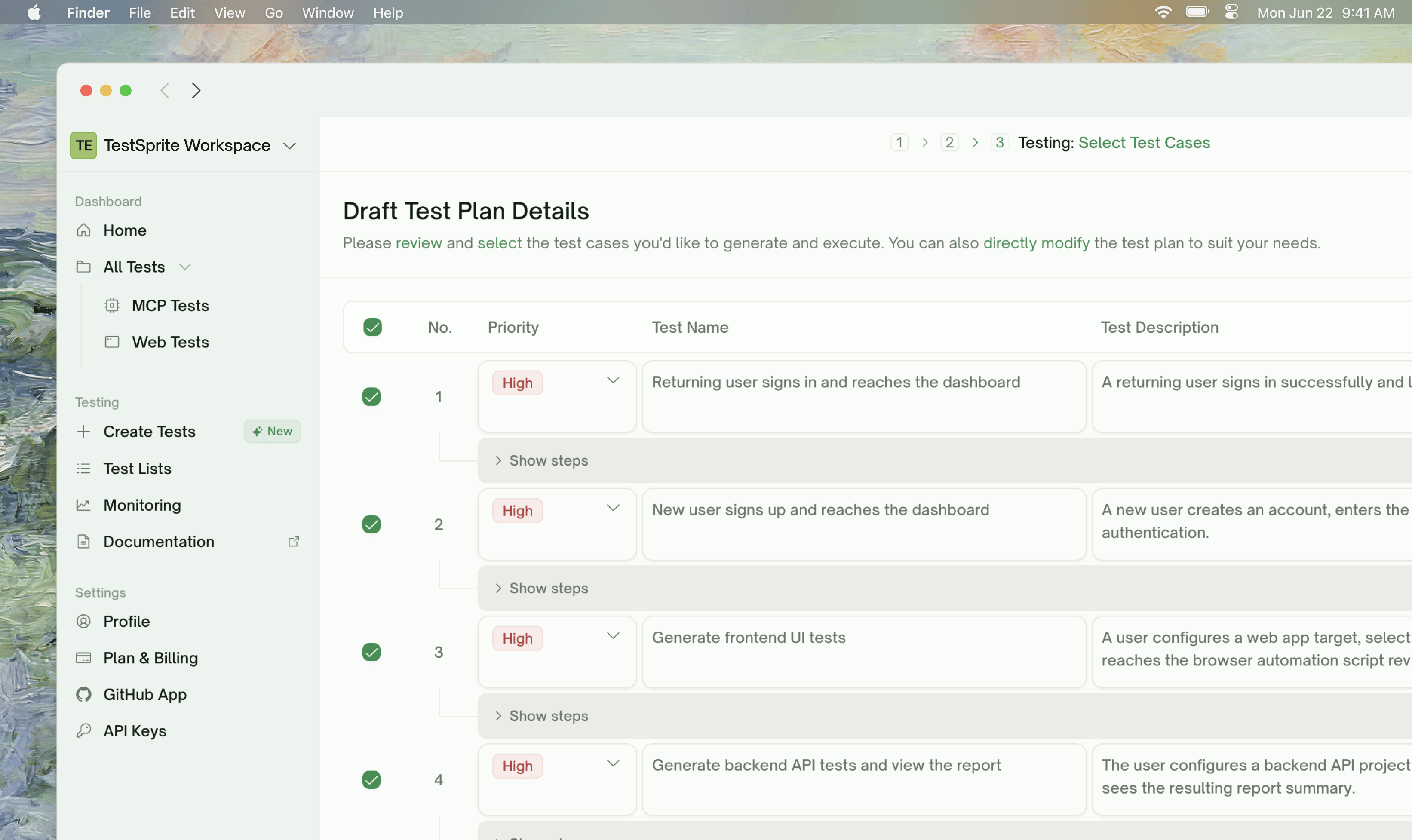 ## What Plan Generation Does
UI Plan Generation takes the [Feature Exploration](/web-portal/core/ui/feature-exploration) output — the live walks TestSprite did through your app — and turns each feature into a list of test cases grounded in **real observed flows**. The plan is the contract you review and edit before any test code is written.
```mermaid theme={null}
flowchart LR
A[Feature Exploration
## What Plan Generation Does
UI Plan Generation takes the [Feature Exploration](/web-portal/core/ui/feature-exploration) output — the live walks TestSprite did through your app — and turns each feature into a list of test cases grounded in **real observed flows**. The plan is the contract you review and edit before any test code is written.
```mermaid theme={null}
flowchart LR
A[Feature Exploration
live walks of your app] --> B[Plan Generation]
B --> C[Flow-grounded test cases
title · description · steps · priority]
C --> D{Your review
edit · prune · add}
D -->|Generate| E[UI test code
Python + Playwright]
```
UI plans are **flow-grounded**: each case references an actual sequence of clicks, fills, and assertions TestSprite saw work during exploration. A plan row reads like:
> *"Verify a new user can sign up with a valid email and lands on the welcome screen"*
— not a description of an internal endpoint or contract. The plan reflects how a user actually moves through your app.
**Nothing executes during plan generation.** No browser actions are issued. Plan generation is a pure read of: explored features + your description + extra-context hints + (Pro) your account-level UI conventions.
## What Goes Into the Plan
| Input | Where it comes from | How it's used |
| :---------------------------------- | :------------------------------------------------------------- | :-------------------------------------------------------------- |
| Explored features | [Feature Exploration](/web-portal/core/ui/feature-exploration) | One sub-plan per feature, with cases grounded in observed flows |
| PRD / extra context | Configuration step | Shapes what's "in scope" vs "out of scope" |
| Test account credentials | Configuration step | Inform how authenticated paths get tested |
| Site map (Use Case Flow) | Built during exploration | Used as context — TestSprite knows which features connect |
Features that **couldn't be explored** (login wall, paywall, error page) get spec-based plans instead — derived from your description and extra context, but flagged as such so you know they're not flow-grounded.
## The Plan Structure
Each plan row is one test case with a **title**, **description**, and **priority**. Plan generation also produces an underlying **step list** — concrete Actions (clicks, fills, navigations) and Assertions (what to verify) — that's revealed per-row via a Show steps toggle.
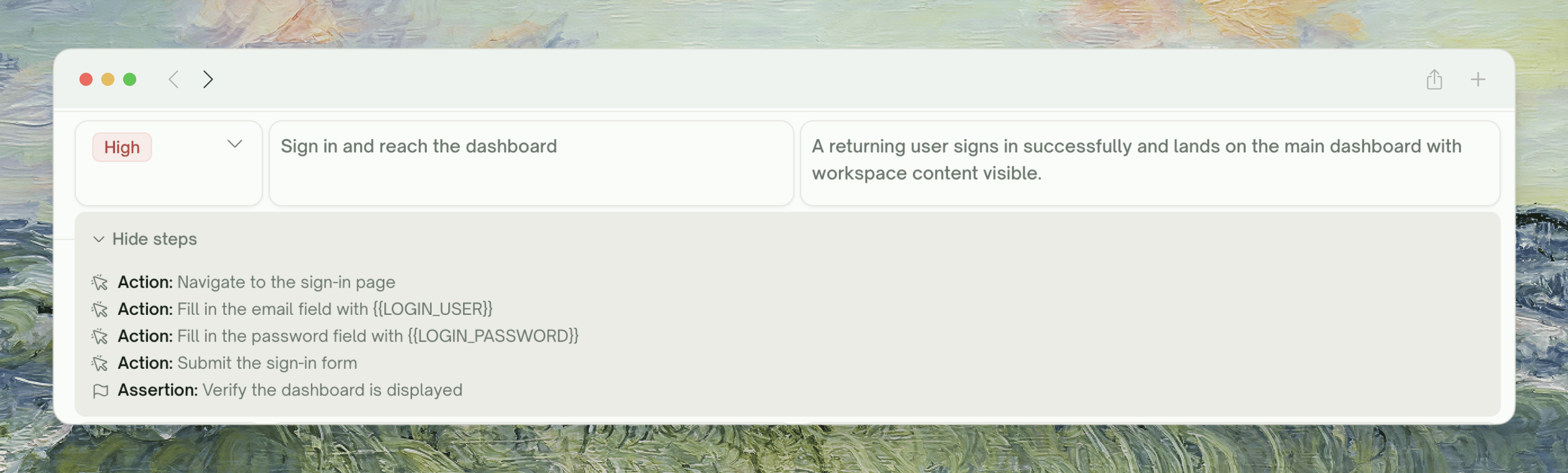 Case count varies with feature complexity. A simple "Forgot Password" might get a couple of cases; a complex "Checkout" can produce 10+. Cases range from focused checks ("error shown when password is wrong") to whole-flow walks ("sign up, verify email, land on welcome").
**Plans use real observed flows when exploration covered the feature.** If feature exploration walked a checkout flow end-to-end, the plan knows the actual button labels ("Place order"), the actual confirmation URL, the actual fields in the address form. The plan will reference those literally — not generic "submit button". Features that couldn't be explored (login wall, paywall) get spec-based plans derived from your description instead.
## Reviewing the Plan
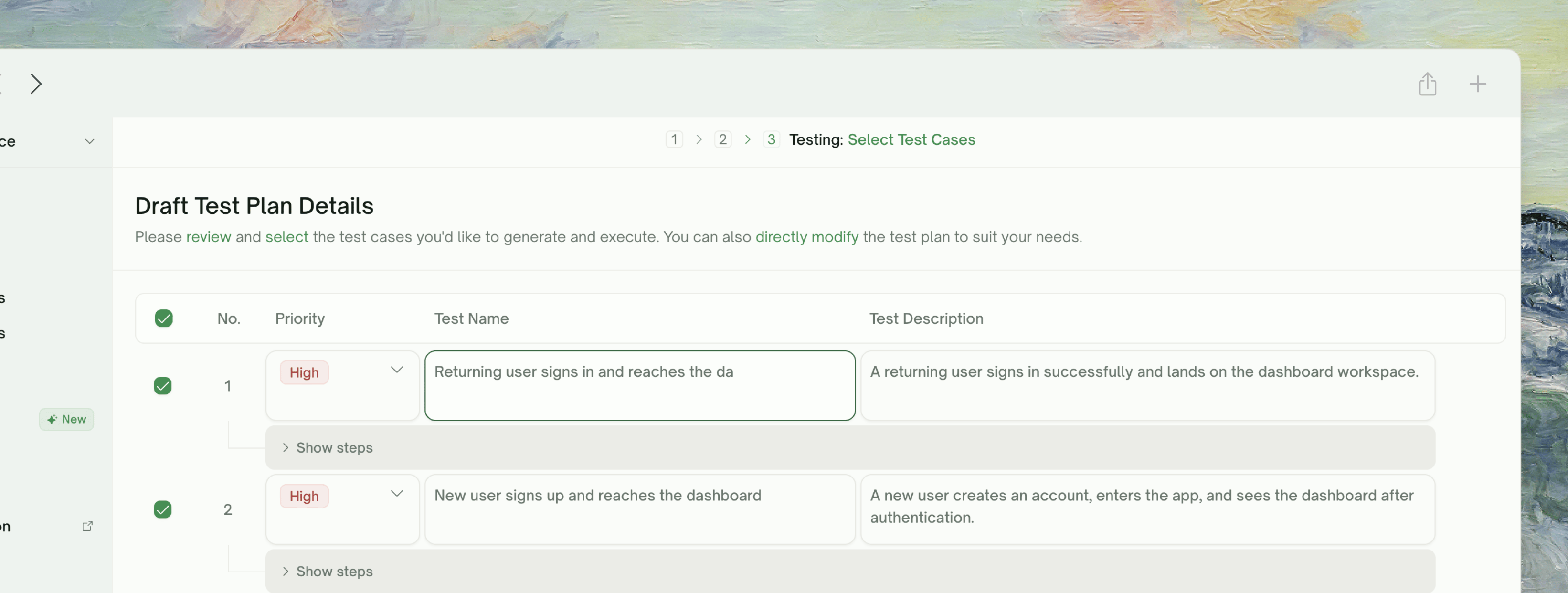
The plan view is a flat list of cases. Each row shows checkbox · No. · priority · title · description, with a per-row toggle to reveal the underlying step list.
The description is what drives generation. Click **Show steps** under the row to see the Action / Assertion list TestSprite will execute. Steps are read-only — adjust them by editing the description above.
Case count varies with feature complexity. A simple "Forgot Password" might get a couple of cases; a complex "Checkout" can produce 10+. Cases range from focused checks ("error shown when password is wrong") to whole-flow walks ("sign up, verify email, land on welcome").
**Plans use real observed flows when exploration covered the feature.** If feature exploration walked a checkout flow end-to-end, the plan knows the actual button labels ("Place order"), the actual confirmation URL, the actual fields in the address form. The plan will reference those literally — not generic "submit button". Features that couldn't be explored (login wall, paywall) get spec-based plans derived from your description instead.
## Reviewing the Plan
The plan view is a flat list of cases. Each row shows checkbox · No. · priority · title · description, with a per-row toggle to reveal the underlying step list.
The description is what drives generation. Click **Show steps** under the row to see the Action / Assertion list TestSprite will execute. Steps are read-only — adjust them by editing the description above.
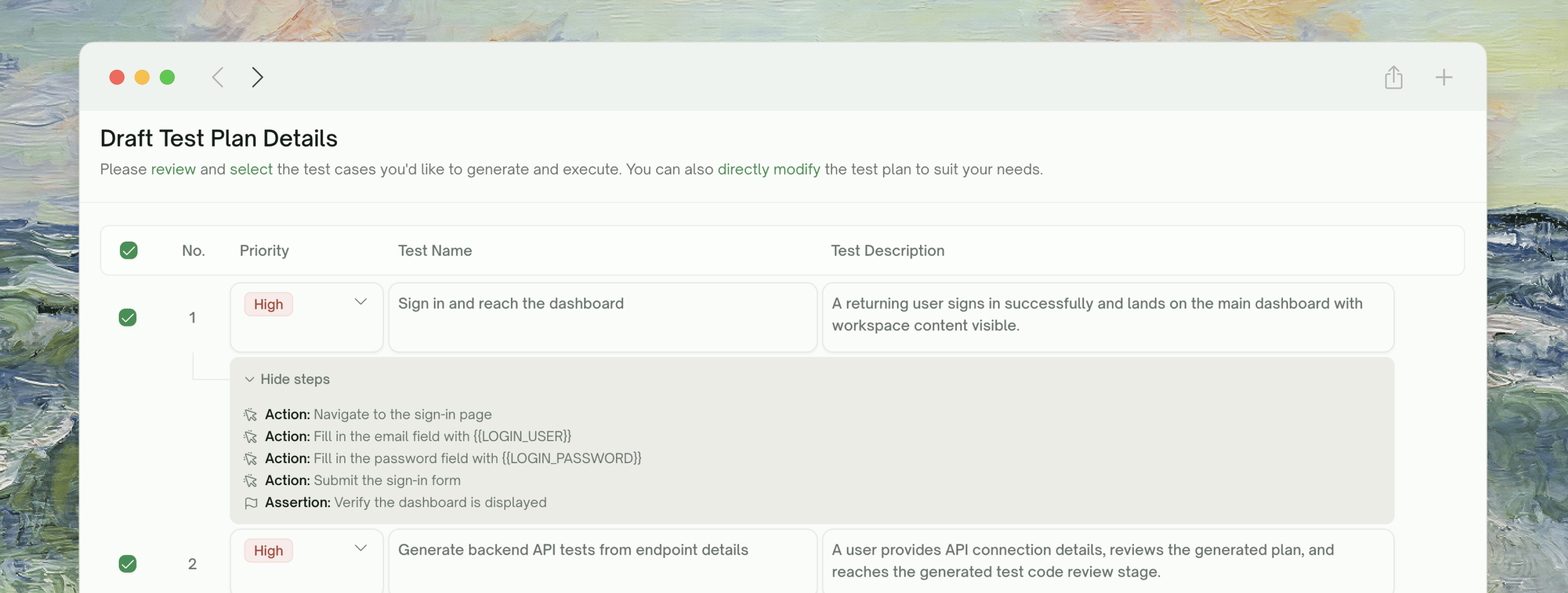 Per-row checkbox toggles a single case. The header checkbox toggles **Select All** for the whole list.
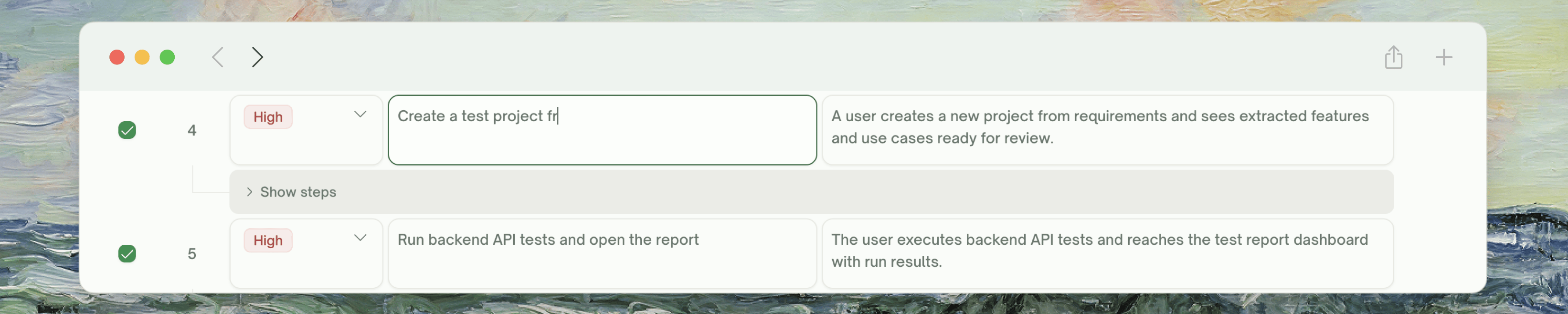
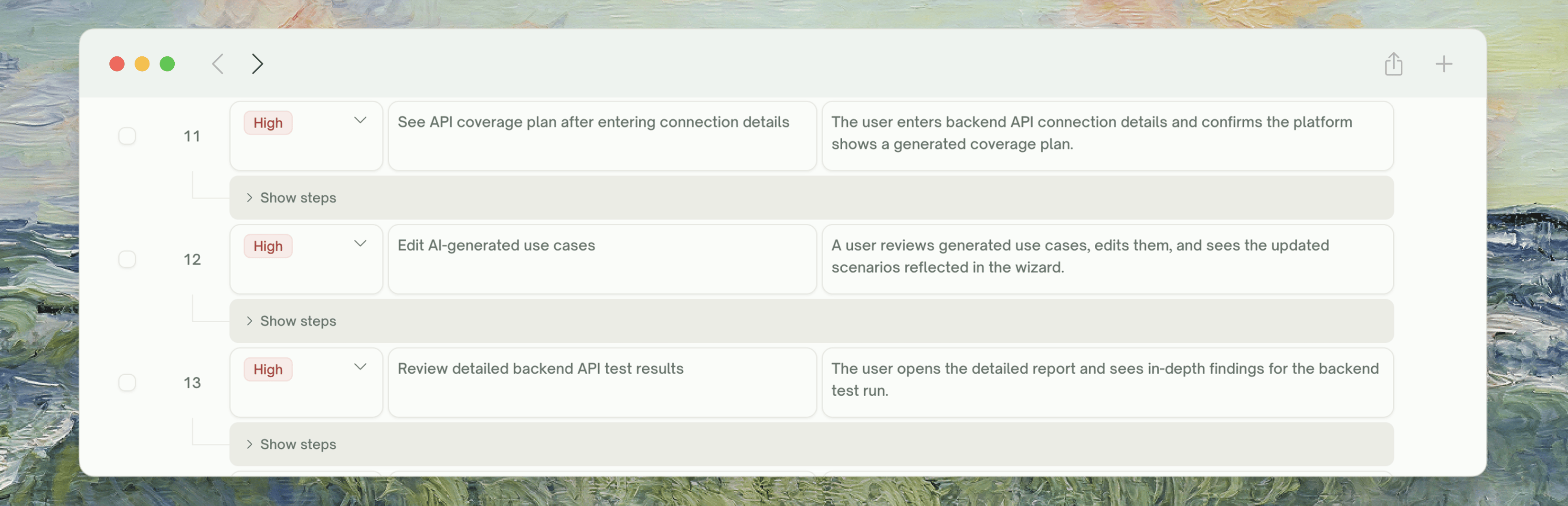 Both **Test Name** and **Test Description** are direct text inputs. Plain-text edits feed directly into generation.
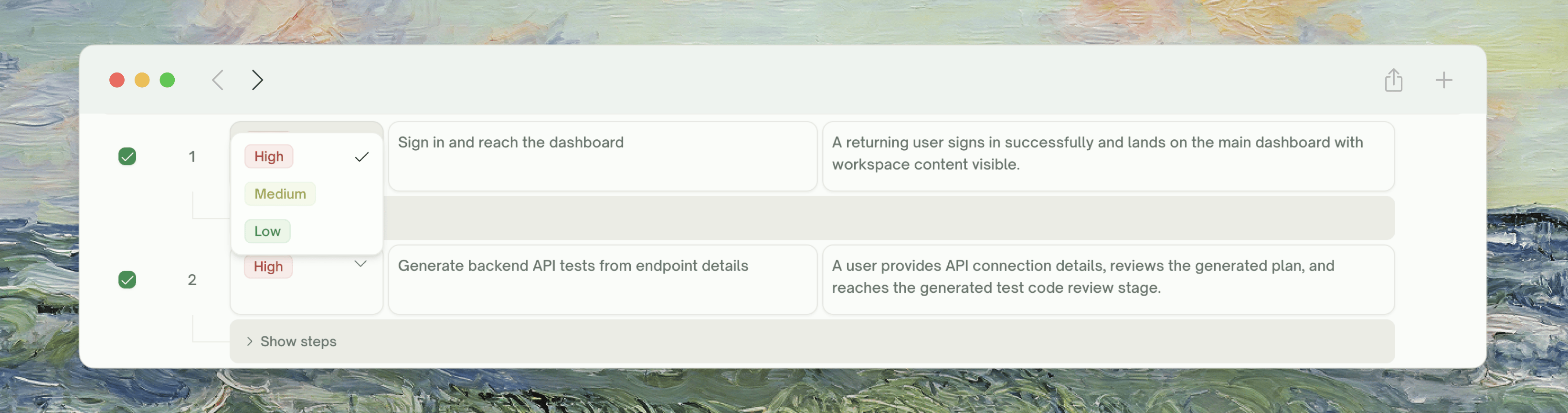
 Each row has a Priority dropdown (default **Medium**). Higher-priority cases run earlier when execution kicks in.
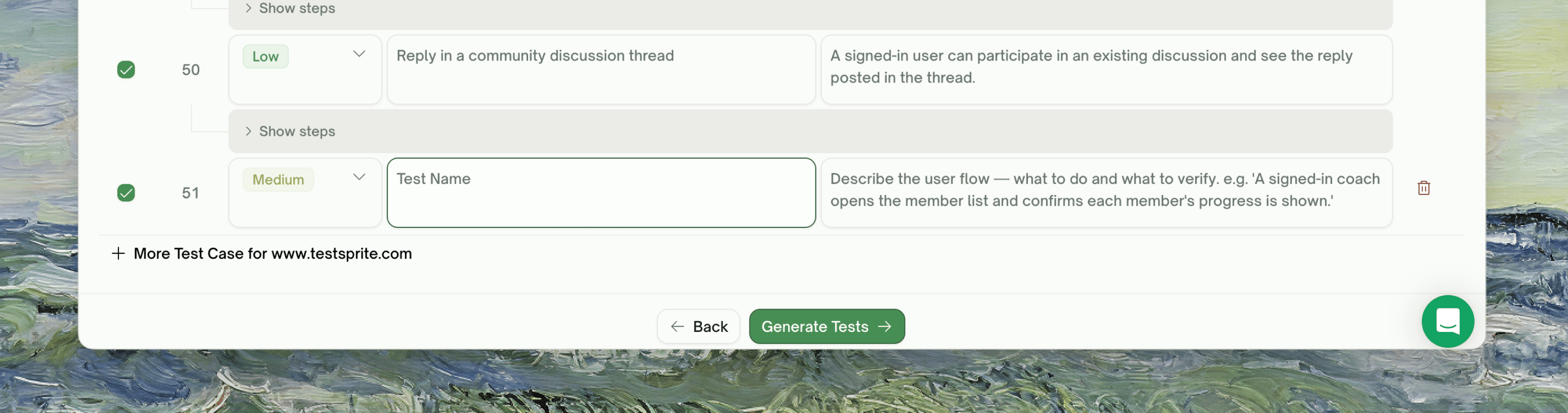
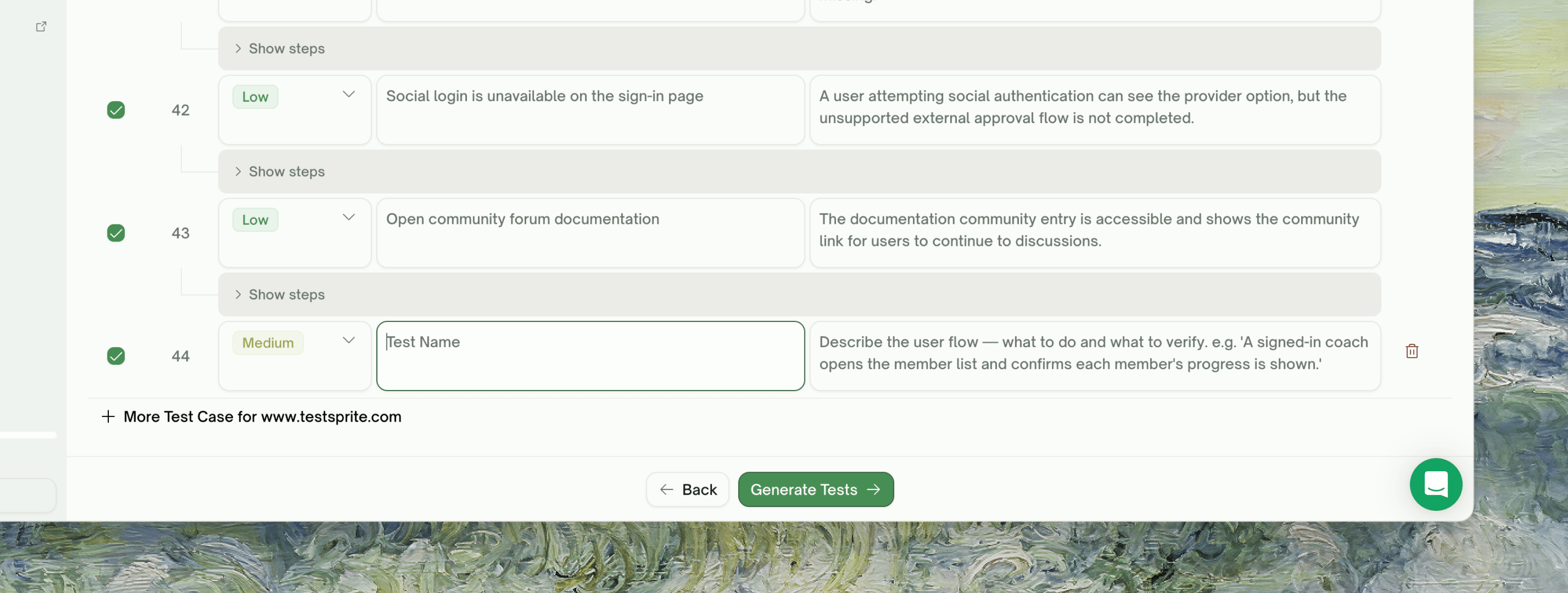
 Click **+ More Test Case** at the bottom of the list (the button is suffixed with the project name). A new row is inserted with empty title and description for you to fill in — included in the same generation batch as the rest.
 **Don't be precious about pruning.** Selecting all is usually right on a first run for full coverage. The high-leverage cases tend to be 60% of what's there; pruning the rest makes runs faster but doesn't change correctness.
## Adding Test Cases in Natural Language
The bottom of the plan list has a chat input. TestSprite parses the request, figures out which feature it applies to, and writes a new case row.
**Don't be precious about pruning.** Selecting all is usually right on a first run for full coverage. The high-leverage cases tend to be 60% of what's there; pruning the rest makes runs faster but doesn't change correctness.
## Adding Test Cases in Natural Language
The bottom of the plan list has a chat input. TestSprite parses the request, figures out which feature it applies to, and writes a new case row.
 ```text Targeted addition theme={null}
Add a test for the Cart feature: user adds 3 items, then removes 1, then verifies the count is 2 and the total updates correctly.
```
```text Cross-feature scenario theme={null}
Test that signing out from any page returns the user to the login screen.
```
```text Visual / accessibility theme={null}
For the Search feature, add a test that the keyboard arrow keys navigate through the results dropdown.
```
**The added test gets grounded if the feature was explored.** If exploration walked the Cart, the new "remove an item" test inherits the explored selectors and flow. If the feature wasn't explored, the new case is spec-based.
## Refining the Plan via Natural Language
Beyond Add-a-test, the chat panel supports broader refinements:
```text Targeted addition theme={null}
Add a test for the Cart feature: user adds 3 items, then removes 1, then verifies the count is 2 and the total updates correctly.
```
```text Cross-feature scenario theme={null}
Test that signing out from any page returns the user to the login screen.
```
```text Visual / accessibility theme={null}
For the Search feature, add a test that the keyboard arrow keys navigate through the results dropdown.
```
**The added test gets grounded if the feature was explored.** If exploration walked the Cart, the new "remove an item" test inherits the explored selectors and flow. If the feature wasn't explored, the new case is spec-based.
## Refining the Plan via Natural Language
Beyond Add-a-test, the chat panel supports broader refinements:
 ```text Drop theme={null}
Drop all the accessibility tests — we have a separate a11y suite.
```
```text Scope theme={null}
For the Checkout feature, the test for "guest checkout" doesn't apply — we don't support guest checkout.
```
```text Tighten theme={null}
Make the Login tests more strict about error messages: assert the exact error text, not just that "an error appears".
```
TestSprite applies the request to the affected rows, re-renders the plan, and you can review/undo before clicking **Generate Tests**.
## What "Generate Tests" Triggers
Clicking **Generate Tests** advances the wizard to the next phase. The plan is frozen at click time — subsequent edits would require a re-generation.
Each plan case becomes a runnable Python + Playwright test
## Plan Generation and Free-Plan Limits
The credit cost lands at test generation (one credit per test) and exploration (counted against the 10-feature lifetime cap on Free, unlimited on paid).
## Spec-Based Cases (Fallback for Unexplored Features)
When Feature Exploration couldn't reach a feature — paywall, login failure, transient error — plan generation still produces a plan for it, but **derived from your description and any extra context**, not from a real walk. These cases are flagged with a **Spec-based** badge.
Spec-based cases are best-effort:
* **They might be wrong about specific selectors or button labels** (no observed flow to ground them)
* **They might miss flows you actually have** (only what you described made it into the plan)
* **They still run.** Generation produces real Playwright code; selectors are resolved against the live DOM at run time.
If a spec-based case fails on first run, refine in chat with the actual UI labels — TestSprite will rewrite the test against the real flow.
## When the Plan Looks Wrong
The case is spec-based or pre-redesign. Refine: "The button is labelled 'Save', not 'Submit'". TestSprite rewrites.
Feature Exploration probably didn't reach it (check the exploration summary panel). Either:
* Re-run exploration with a clearer test account or extra context
* Add cases manually via chat
Add domain-specific extra context: "Our checkout has a special 'Express' lane for returning customers — make sure tests cover that path". Future runs incorporate it.
Untick the ones you find low-value. Plan generation errs on the side of coverage; you can prune to taste.
The PRD shapes the plan but doesn't override exploration. If exploration didn't walk the feature your PRD describes, plan generation falls back to spec-based — and your PRD wording may not have specific enough selectors to make the case work. Refine after generation.
## Where to Go Next
The next phase — turn the plan into runnable Playwright code
What you'll see during execution
Natural-language adjustments after generation
Step back to the journey map
```text Drop theme={null}
Drop all the accessibility tests — we have a separate a11y suite.
```
```text Scope theme={null}
For the Checkout feature, the test for "guest checkout" doesn't apply — we don't support guest checkout.
```
```text Tighten theme={null}
Make the Login tests more strict about error messages: assert the exact error text, not just that "an error appears".
```
TestSprite applies the request to the affected rows, re-renders the plan, and you can review/undo before clicking **Generate Tests**.
## What "Generate Tests" Triggers
Clicking **Generate Tests** advances the wizard to the next phase. The plan is frozen at click time — subsequent edits would require a re-generation.
Each plan case becomes a runnable Python + Playwright test
## Plan Generation and Free-Plan Limits
The credit cost lands at test generation (one credit per test) and exploration (counted against the 10-feature lifetime cap on Free, unlimited on paid).
## Spec-Based Cases (Fallback for Unexplored Features)
When Feature Exploration couldn't reach a feature — paywall, login failure, transient error — plan generation still produces a plan for it, but **derived from your description and any extra context**, not from a real walk. These cases are flagged with a **Spec-based** badge.
Spec-based cases are best-effort:
* **They might be wrong about specific selectors or button labels** (no observed flow to ground them)
* **They might miss flows you actually have** (only what you described made it into the plan)
* **They still run.** Generation produces real Playwright code; selectors are resolved against the live DOM at run time.
If a spec-based case fails on first run, refine in chat with the actual UI labels — TestSprite will rewrite the test against the real flow.
## When the Plan Looks Wrong
The case is spec-based or pre-redesign. Refine: "The button is labelled 'Save', not 'Submit'". TestSprite rewrites.
Feature Exploration probably didn't reach it (check the exploration summary panel). Either:
* Re-run exploration with a clearer test account or extra context
* Add cases manually via chat
Add domain-specific extra context: "Our checkout has a special 'Express' lane for returning customers — make sure tests cover that path". Future runs incorporate it.
Untick the ones you find low-value. Plan generation errs on the side of coverage; you can prune to taste.
The PRD shapes the plan but doesn't override exploration. If exploration didn't walk the feature your PRD describes, plan generation falls back to spec-based — and your PRD wording may not have specific enough selectors to make the case work. Refine after generation.
## Where to Go Next
The next phase — turn the plan into runnable Playwright code
What you'll see during execution
Natural-language adjustments after generation
Step back to the journey map