> ## Documentation Index
> Fetch the complete documentation index at: https://docs.testsprite.com/llms.txt
> Use this file to discover all available pages before exploring further.
# Run Behavior
> Configure how your tests run — browser viewport size, single-login mode, max concurrency, and whether cases stick to their authored plan.
Open the project → Project Settings → Test Execution → Run Behavior in the sidebar.
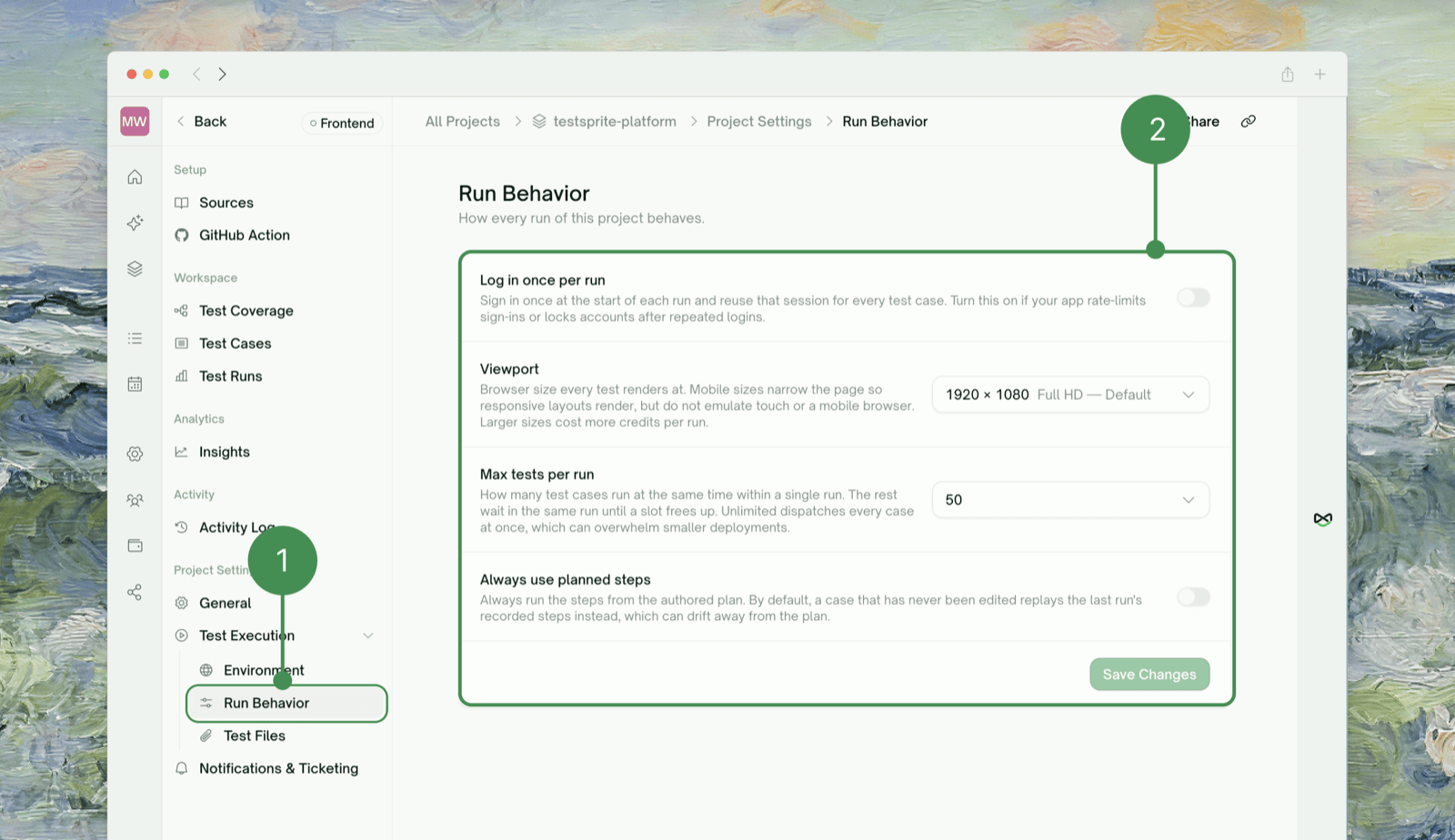 **Viewport** and **Log in once per run** are Frontend-only — a Backend project has no browser to apply them to.
| Setting | What it does | Change it when |
| :- | :- | :- |
| **Viewport** | Browser window size for every test in the project (desktop/tablet/mobile presets, e.g. `1920×1080` default, `390×844` iPhone). Mobile presets narrow the page but don't emulate touch or a mobile browser. Bigger = more credits per run. | You need to check a layout at a specific breakpoint |
| **Log in once per run** | Signs in once, shares that session across all cases in the run instead of logging in per case. Forced on (and locked) for OTP-based auth. | Your app rate-limits sign-ins or locks the account after repeated logins |
| **Max tests per run** | How many cases run concurrently; the rest queue for a free slot. Options: `10 / 25 / 50 / 75 / 100 / Unlimited` — default `50`. | Turn it **down** for a smaller/shared target that chokes under load; turn it **up** to finish runs faster |
| **Always use planned steps** | Forces every case to run its authored plan. Off by default — an unedited case instead replays its last run's recorded steps, which can drift from the plan over time. | You've noticed a case drifting from its plan and want the plan to always win |
**Two quick presets** — Daily regression: default viewport, planned steps **on** (stay aligned with the plan), max tests at default or lower for a shared target. Mobile-focused: just switch **Viewport** to a mobile preset; the other three settings aren't specific to mobile, so pick them the same way you would for any other run.
## Where to Go Next
Run tests automatically with these same settings, on PRs and pushes
Trigger a fresh run after changing a setting
Where a run's results land once it's finished
Haven't created a project yet? Start here
This documentation is built and hosted on [Mintlify](https://mintlify.com), a developer documentation platform.
**Viewport** and **Log in once per run** are Frontend-only — a Backend project has no browser to apply them to.
| Setting | What it does | Change it when |
| :- | :- | :- |
| **Viewport** | Browser window size for every test in the project (desktop/tablet/mobile presets, e.g. `1920×1080` default, `390×844` iPhone). Mobile presets narrow the page but don't emulate touch or a mobile browser. Bigger = more credits per run. | You need to check a layout at a specific breakpoint |
| **Log in once per run** | Signs in once, shares that session across all cases in the run instead of logging in per case. Forced on (and locked) for OTP-based auth. | Your app rate-limits sign-ins or locks the account after repeated logins |
| **Max tests per run** | How many cases run concurrently; the rest queue for a free slot. Options: `10 / 25 / 50 / 75 / 100 / Unlimited` — default `50`. | Turn it **down** for a smaller/shared target that chokes under load; turn it **up** to finish runs faster |
| **Always use planned steps** | Forces every case to run its authored plan. Off by default — an unedited case instead replays its last run's recorded steps, which can drift from the plan over time. | You've noticed a case drifting from its plan and want the plan to always win |
**Two quick presets** — Daily regression: default viewport, planned steps **on** (stay aligned with the plan), max tests at default or lower for a shared target. Mobile-focused: just switch **Viewport** to a mobile preset; the other three settings aren't specific to mobile, so pick them the same way you would for any other run.
## Where to Go Next
Run tests automatically with these same settings, on PRs and pushes
Trigger a fresh run after changing a setting
Where a run's results land once it's finished
Haven't created a project yet? Start here
This documentation is built and hosted on [Mintlify](https://mintlify.com), a developer documentation platform.