

Why the CLI is CI-friendly
Thetestsprite CLI is designed from the ground up for unattended execution:
- Non-interactive auth — set
TESTSPRITE_API_KEYas a secret; the CLI never prompts when the variable is present. - Stable
--output json— every command emits a machine-readable JSON envelope that your pipeline can parse and forward. - Stable exit codes — exit 0 means the run passed; any non-zero exit lets the shell fail the job. No text scraping required.
Authenticating in CI
Set your API key as a repository or environment secret. In GitHub, go to Settings → Secrets and variables → Actions and click New repository secret: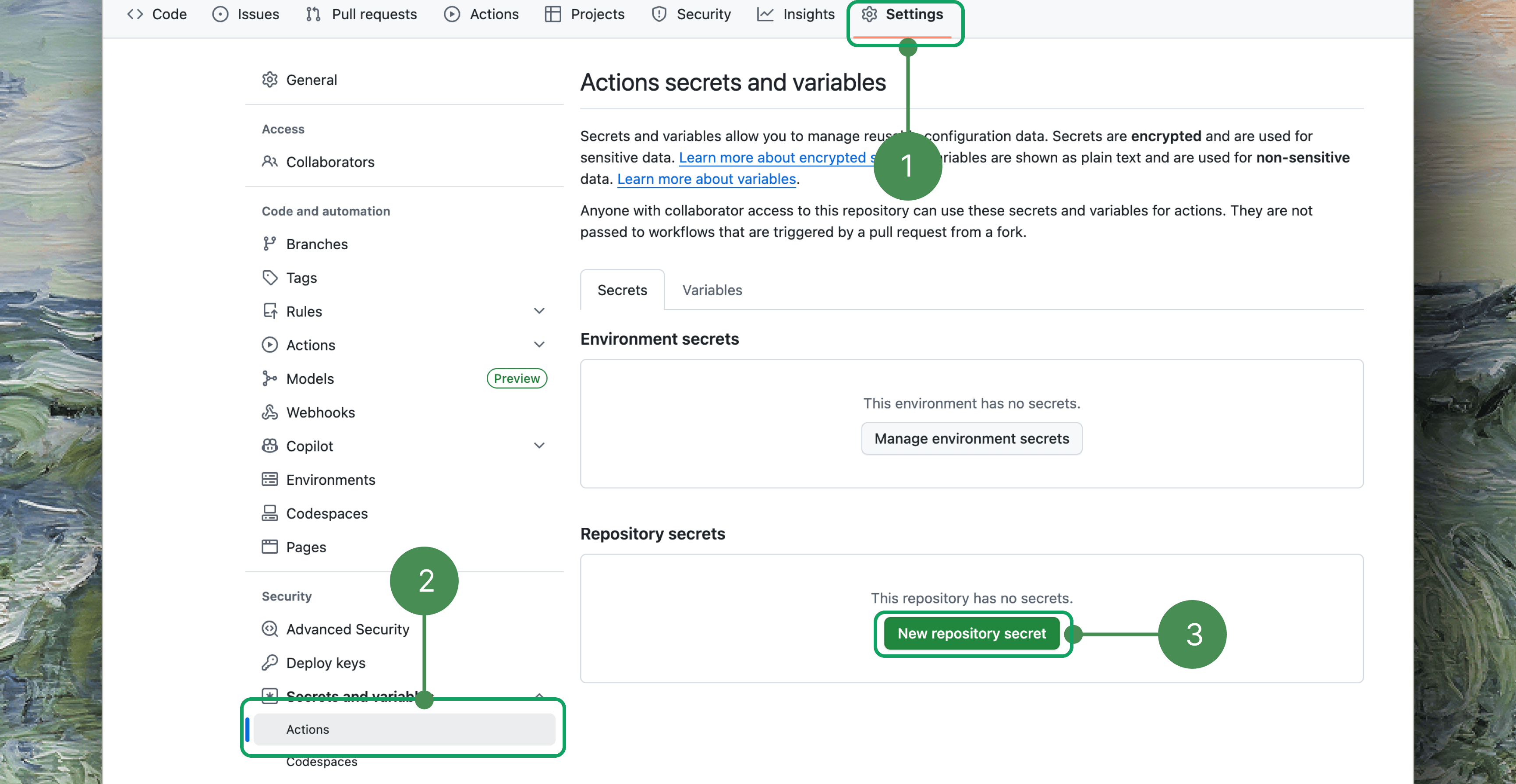
TESTSPRITE_API_KEY before the credentials file, so no testsprite setup step is needed in CI.
In most pipelines the env var alone is enough — you don’t need to run any setup command. If you do need a credentials file on disk (for other tooling), write one non-interactively from the same env var with --no-agent to skip the skill install:
TESTSPRITE_API_KEY from the environment, verifies the key, writes ~/.testsprite/credentials, and prints an identity summary.
Gating on the result
The CLI exits non-zero whenever a run does not pass — failed, blocked, cancelled, or timed out. Your shell or CI runner treats that as a job failure automatically.A GitHub Actions workflow
Install and invoke the
testsprite CLI directly, as the example below does — this is the supported way to run TestSprite in CI, on any platform. If you previously set up an older TestSprite GitHub Action from the marketplace, migrating to the CLI gives you stable exit codes, JUnit output, and a consistent pass/fail verdict.JUnit XML reports
For CI systems that render JUnit natively (GitHub Actions test reporters, GitLab, Jenkins), add--report junit --report-file <path> to a batch, --wait run or rerun. The CLI writes the XML sidecar atomically once polling finishes — --output json on stdout is unchanged, so you can use both together. Extending the “Run tests” step from the workflow above:
--report is gated to the batch --wait path:
- Available on
test run --all --waitand on a batchtest rerun --wait(--all, or severaltest-ids...) — not on a single-test run or rerun. - Requires
--wait(the report is written after polling completes) and--report-file <path>. --report-suite-name <name>optionally overrides the<testsuite name="...">attribute; it defaults totestsprite:<projectId>.- Only
junitis accepted for--reporttoday.
GitHub-native annotations and summaries
On GitHub Actions (GITHUB_ACTIONS=true — set automatically on every runner), a --wait run needs no extra flags to become CI-native:
- Every non-passed run emits one
::error::workflow-command line, so failures annotate the PR checks tab with the test id, status, and dashboard link. - A Markdown results table is appended to the job summary (
$GITHUB_STEP_SUMMARY).
test run <test-id> --wait, test run --all --wait, and a batch test rerun --wait. Two optional flags extend it:
--summary-file <path>— also write a reduced machine summary JSON,{total, passed, failed, timedOut, runs[]}, for downstream steps that don’t want to parse the full--output jsonstream.--gh-output— force the annotations outside GitHub Actions, so you can preview the exact CI output locally.
Parsing JSON output
Pipe--output json to jq to extract fields for downstream steps:
run object contains status, runId, startedAt, finishedAt, codeVersion, and dashboardUrl (when the backend returns a portal link).
Rate limits and retries
The server caps run-triggers at 60 per minute per key. The CLI throttles itself to 50 per minute and automatically retriesRATE_LIMITED responses, honoring the Retry-After header (capped at 3 retries).
For large batches, tune the in-flight concurrency:
--idempotency-key to make retries safe — if the server already accepted the request with that key, it returns the original response instead of triggering a duplicate run:
Handling exit codes
The exit code is your primary signal. Two codes deserve special handling in a pipeline:
All other non-zero exits (auth error, test not found, network failure, test failed) should fail the job and surface the artifact.
Exit Codes
The complete exit-code table
Where to Go Next
Coding Agent Integration
Let your agent drive the verification loop without a human in the middle
Running Tests
All flags and modes for triggering and waiting on runs
Exit Codes
Full exit-code table for branching your pipeline
Configuration
Env vars, profiles, and per-request timeouts