Documentation Index
Fetch the complete documentation index at: https://docs.testsprite.com/llms.txt
Use this file to discover all available pages before exploring further.

What Auto Cleanup Does
Every run of your API tests creates real records on your test environment — users, orders, sessions, files, whatever your domain has. Without cleanup:Cleanup runs even when tests pass. The point is to leave your test environment in a known-empty state, not to reverse failed runs. After Run → Cleanup → done, your environment looks identical to what it did before Run started.
How Cleanup Works
After a run finishes, TestSprite identifies the records created during the run and issues DELETE calls in the order that respects their dependencies — children first, then parents. You can’t delete a user before its orders are gone (FK constraint), so TestSprite removes orders before users.What Counts as a Cleanup-Relevant Record
Not every value produced during a run triggers cleanup. Atotal_amount is just a value used downstream — there’s nothing to delete. An order_id is a record handle — deletion is needed.
TestSprite identifies cleanup-relevant records by recognizing handles to resources created during the run (typically IDs returned by POST or PUT calls with a matching DELETE endpoint).
These flagged records appear in Dynamic Variables with their Deleted by column populated, and feed into the cleanup chain.
The Cleanup Tab
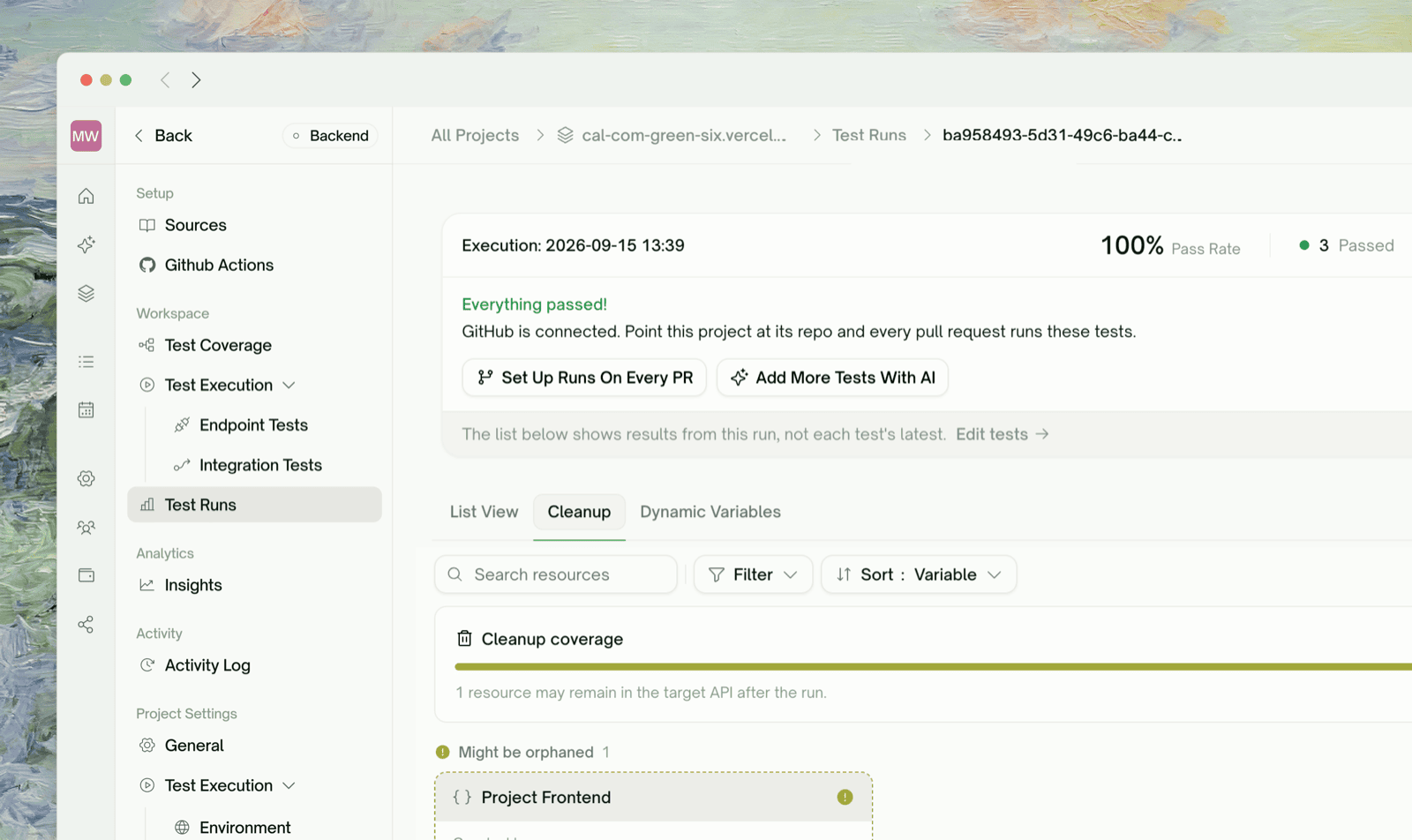
Sidebar → Workflows → Cleanup. This view shows what got deleted (or attempted) after the most recent run.
| Section | What you see |
|---|---|
| Might be orphaned | Resources we couldn’t confirm were deleted — surfaced first so you can act on them. Each card shows the captured ID and source endpoint so you can verify or delete manually. |
| Cleaned up | Resources confirmed gone — either via a planned cleanup test that Passed or via the auto-sweep DELETE returning 2xx/404. |
| Field | What it shows |
|---|---|
| Resource label | The variable name that triggered the cleanup (e.g., order_id) |
| Created by | The test that produced the variable in the first place |
| Cleaned up | The cleanup test (with status chip), or an Auto-cleaned badge for sweep-only cleanups, or a Might be orphaned badge when neither confirmed deletion |
When Cleanup Runs
Cleanup runs after the test run completes — once all endpoint and integration tests finish, TestSprite issues the DELETE calls. Cleanup typically completes in 5–60 seconds depending on resource count. The dashboard stays usable during cleanup; the run isn’t fully “done” until cleanup finishes.When Cleanup Fails
A cleanup DELETE can fail for several reasons. TestSprite handles each differently:| Failure | What it does | What you should do |
|---|---|---|
| 404 Not Found | Treated as success — the resource is gone | Nothing — the record was already cleaned up by a cascade or another mechanism |
| 5xx server error | Retried briefly | If retries also fail, the resource lands in Might be orphaned |
| 4xx other than 404 (e.g., 403, 409) | Marks the cleanup test Failed | Click into the cleanup test to see the response body and figure out why DELETE was rejected |
| Auth expired mid-cleanup | Refreshes via Auto-Auth if configured, otherwise marks the cleanup test Failed | If you’re using Static Credentials and your token expired mid-run, switch to Auto-Auth |
Manual Cleanup
If TestSprite couldn’t auto-clean a resource (no matching DELETE endpoint discovered), the resource appears under Might be orphaned in the Cleanup tab, with the ID and source endpoint surfaced for manual verification. Two paths:- Add a DELETE endpoint to discovery — re-run API Discovery once your DELETE endpoints are reachable
- Manually delete and dismiss — clean up via your own backend tooling, then dismiss the cleanup row
Cleanup and Test Independence
Cleanup is what makes test runs idempotent — every run starts from the same empty-environment state and produces the same outcome.Without cleanup
- Run 1 passes (clean slate)
- Run 2 fails on POST /users (email collision with run 1’s user)
- Run 3 has a different shape entirely (depending on what survived)
With cleanup — matters most for
- Scheduled runs: nightly schedules accumulate fast without cleanup
- CI integration: CI runs on every PR; without cleanup, the test environment fills with PR-sized garbage
- Eventual-consistency tests: an unbounded growing data set changes pagination/sort order
Edge Cases & Troubleshooting
Cleanup left some records behind
Most likely causes:
- No DELETE endpoint discovered — surfaced under “Might be orphaned” in the Cleanup tab. Add the endpoint manually on the configuration step (or in a new project) so cleanup has a verb to invoke.
- DELETE endpoint failed with 4xx — the cleanup test row shows Failed with response body. Often an auth or permission issue with the test account.
- Resource has deeply nested children — TestSprite handles direct dependencies, but deep nesting (4+ levels) can sometimes need a hint. Refine in chat: “DELETE /comments must run before DELETE /posts must run before DELETE /users”.
Cleanup is deleting records I want to keep
Refine: “Don’t auto-clean up the seed-data user
system@testsprite.com”. TestSprite will skip cleanup for resources matching that filter.Cleanup runs are slow (>5 minutes)
Cleanup runs are slow (>5 minutes)
Three causes:
- Many resources — 1000+ created records, each one a separate DELETE call. Either prune your test plan to create less, or accept the cost.
- DELETE endpoint is slow — your /resource/ DELETE itself takes 5+ seconds. Investigate why on your API side.
- Many failures being retried — check the Cleanup tab for the failure pattern.
Cleanup didn't run at all
Two checks:
- The run finished with all tests Passed or Failed (not Pending). Cleanup runs after run completion; if the run is still in progress, cleanup hasn’t started.
- At least one cleanup-relevant record exists. If your tests don’t produce record IDs, there’s nothing to clean up.
My cleanup DELETEs are getting rate-limited
Cleanup issues DELETEs in parallel for resources of the same type. If your API has aggressive rate limits on DELETE, this can trip them. Refine: “Issue cleanup DELETEs serially, not in parallel” — TestSprite will sequence them.
Where to Go Next
Dynamic Variables
Values produced by one test and used by another
Dependency Chains
How run order is determined
Auto-Auth (Pro)
Keeps auth alive across long-running cleanups
Data Flow
See cleanup DELETEs in the same view as the run’s other calls