Documentation Index

Fetch the complete documentation index at: https://docs.testsprite.com/llms.txt

Use this file to discover all available pages before exploring further.

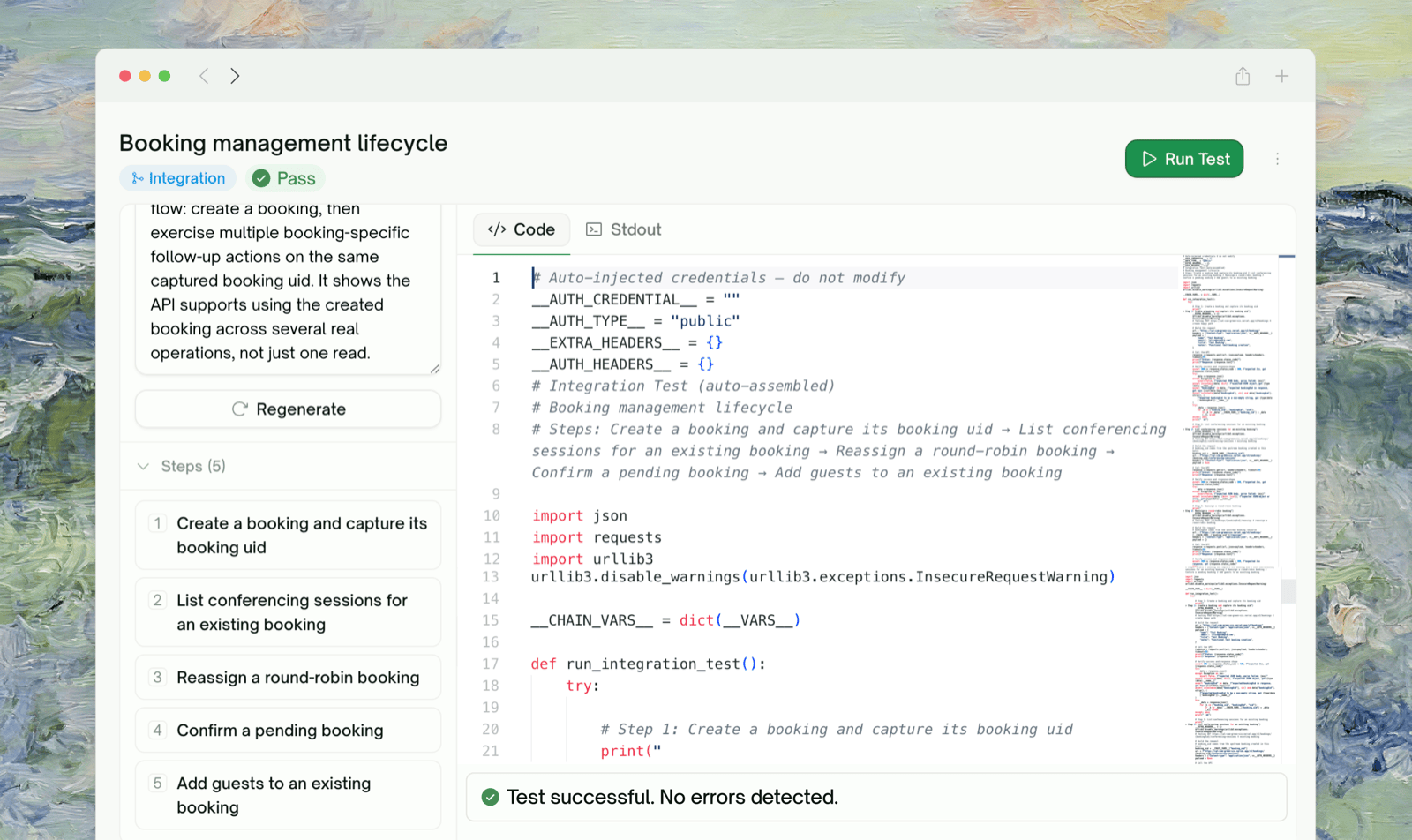
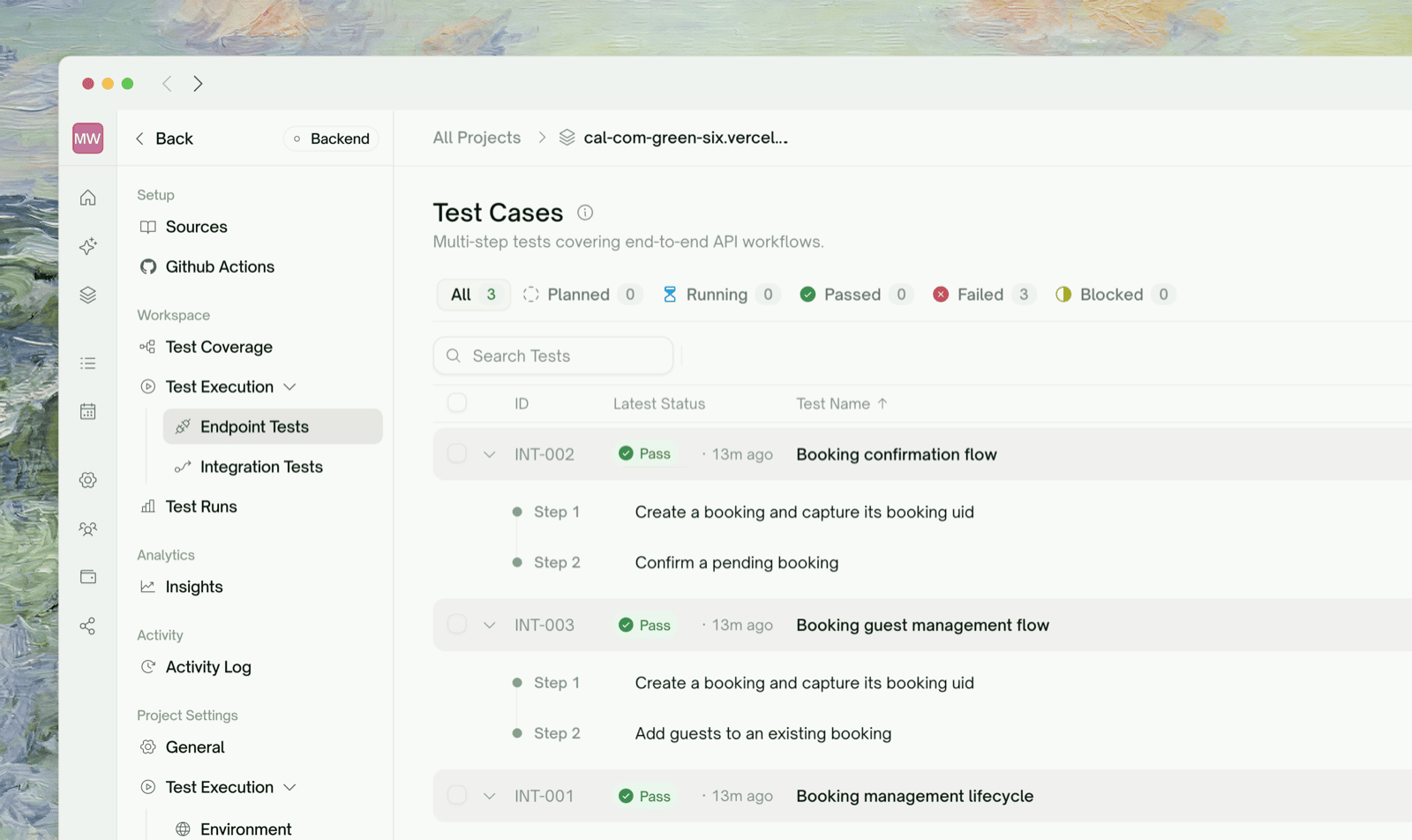
Integration Tests page with assembled chains

What Integration Tests Are

An integration test exercises a sequence of endpoints as a single workflow. The classic shape:
POST /users        → create a user, capture user_id
POST /orders       → create an order for that user, capture order_id
GET  /orders/{id}  → confirm the order is retrievable
DELETE /orders/{id}→ cancel the order, confirm 204
Each step depends on data from the previous step. The user ID returned by step 1 is used in step 2’s body; the order ID returned by step 2 is used in steps 3 and 4. TestSprite identifies these dependencies and runs the chain end-to-end as a single test. Related capabilities — each has its own page:

Dynamic Variables

Values captured from one step and reused in another

Dependency Chains

How chained steps run in the right order

Auto Cleanup

Records created during a run get deleted afterward

Data Flow

Visual graph of every HTTP call across a chain

Where Integration Tests Live in the UI

Integration tests have their own sidebar tab — Workflows → Integration Tests — distinct from the per-endpoint Endpoint Tests list. From this tab you can:
  • Browse the list of auto-assembled chains
  • Click into any chain to see its step sequence + per-step status
  • Rerun all chains from the toolbar, or open a chain and rerun it on its own
  • Refine a chain in chat (add a step, drop a step, change the sequence)
  • See per-chain statistics — how many steps, which captures flow through it

What a Chain Looks Like

A chain is a sequence of steps with data flowing forward — one step produces a value, later steps consume it.

Each arrow represents data flowing from one step’s response to the next step’s request. TestSprite identifies these handoffs and runs the steps in the correct order. See Dynamic Variables for how captured values surface in the UI, and Dependency Chains for how the run order is determined.

Why Integration Tests Matter

A typical user journey through your API has multiple steps that have to work together. Endpoint tests verify each step in isolation; integration tests verify the handoffs. Things integration tests catch that endpoint tests miss:
Failure modeCaught by
GET /users returns a user with id 42 but POST /users created id 42a-format stringsIntegration
POST /orders silently strips the metadata field that GET /orders/ expects to round-tripIntegration
DELETE works, but the GET that follows still returns the record (eventual consistency bug)Integration
The order_id field in POST /orders’ response is named differently than what GET /orders/ needs as path paramIntegration
These are the common “individual endpoints work but the system doesn’t” bugs. Endpoint tests pass; integration tests catch the misalignment.

Per-Chain View

Click into an integration test from the list. The detail page shows:
Integration test detail page with step list
SectionWhat you see
Step listEach step with its method, path, status chip, and what values it produces or uses
Variable wiringBetween consecutive steps, badges show which variable was produced and consumed
Per-step request/responseClick a step to expand the full HTTP detail (same shape as an endpoint test detail)
Chain-level errorIf the chain failed, surface where it broke and why

When a Chain Fails

Integration tests can fail in three distinguishable ways:
Integration test detail page with step list
Failure shapeMeaningWhere to look
Step N failed assertionStep N’s HTTP call returned, but the assertion failedClick step N → review request/response → refine or fix the API
Step N TEST BLOCKEDAn upstream step (M before N) failed, so step N couldn’t runFix step M first; step N runs automatically on rerun
Variable not foundStep N needs a value that wasn’t produced by any earlier stepRefine in chat with a hint: “Make sure POST /users captures user_id”
The “TEST BLOCKED” pattern is what differentiates Blocked from Failed — see Endpoint Tests.

Auto Cleanup Pairing

Integration tests create records in your test environment — users, orders, sessions. After a chain runs, TestSprite automatically removes those records so subsequent runs start fresh.

Auto Cleanup

Records created during a run get deleted afterward — no manual configuration
Cleanup chains run after every Run / Rerun, even if the test passed. The point is to leave your test environment in a known-empty state, not to reverse only failures.

Frontend Equivalent

UI testing has its own multi-step concept — a “use case” with multiple actions in a browser. The mental model is the same (sequence with handoffs) but the underlying execution is browser actions instead of HTTP calls.

UI Testing — Overview

The frontend journey — multi-step user flows in the browser

Edge Cases & Troubleshooting

Common when your API is mostly read-only (no chained mutations) or when initial plan generation had sparse hints. To get integration coverage:
  • Re-run plan generation with a hint: “Generate integration chains that exercise create → read → update → delete on /orders”
  • Or refine in chat to ask for specific multi-step flows
Open the chain, use the chat, and describe the right shape: “The right order is POST /users → POST /sessions → POST /orders, not /users → /orders directly”. TestSprite re-runs with the corrected sequence.
A later step needs a value that no earlier step provided. Common causes:
  • Naming mismatch: an earlier step produces user_id but the later step references userId. Refine in chat to align the names.
  • Earlier step didn’t return the expected field: the producer step Passed but its response didn’t include the field. Click that step and review the response — the field may not exist. Refine to capture from a different field.
Add a wait in chat: “After the POST step, wait 250ms before the GET”. Useful for systems with eventual consistency.
The step has a side effect the chain didn’t account for — for example, it leaves a session active that conflicts with subsequent steps. Either:
  • Refine the step to clean up after itself
  • Or add a cleanup step explicitly: “After the GET step, DELETE the session created in step 2”

Where to Go Next

Dynamic Variables

Where captured values surface in the UI

Dependency Chains

How run order is determined

Auto Cleanup

Records created during a run get deleted afterward

Data Flow

Visualize what actually happened during the run